Welcome to Yet Another Useless Blog
Despite the name, we hope you'll find these articles genuinely helpful! 😊
Who are we?
We're Thomas Jungbauer and Toni Schmidbauer — two seasoned IT professionals with over 20 years of experience each. Currently, we work as architects at Red Hat Austria, helping customers design and implement OpenShift and Ansible solutions.
What's this blog about?
Real-world problems, practical solutions. We document issues we've encountered in the field along with step-by-step guides to reproduce and resolve them. Our goal: save you hours of frustrating documentation searches and trial-and-error testing.
Feel free to send us an e-mail or open a GitHub issue.
Recent Posts

Helm Charts Repository Updates
 Thomas Jungbauer
This page shows the latest updates to the stderr.at Helm Charts Repository. The charts are designed for OpenShift and Kubernetes deployments, with a focus on GitOps workflows using Argo CD.
| The content below is dynamically loaded from the Helm repository and always shows the most recent changes. |

The Hitchhiker's Guide to Observability - Limit Read Access to Traces - Part 8
In the previous articles, we deployed a distributed tracing infrastructure with TempoStack and OpenTelemetry Collector. We also deployed a Grafana instance to visualize the traces. The configuration was done in a way that allows everybody to read the traces. Every system:authenticated user is able to read ALL traces. This is usually not what you want. You want to limit trace access to only the appropriate namespace.
In this article, we’ll limit the read access to traces. The users of the team-a namespace will only be able to see their own traces.
The Hitchhiker's Guide to Observability - Here Comes Grafana - Part 7
While we have been using the integrated tracing UI in OpenShift, it is time to summon Grafana. Grafana is a visualization powerhouse that allows teams to build custom dashboards, correlate traces with logs and metrics, and gain deep insights into their applications. In this article, we’ll deploy a dedicated Grafana instance for team-a in their namespace, configure a Tempo datasource, and create a dashboard to explore distributed traces.

The Hitchhiker's Guide to Observability - Adding A New Tenant - Part 6
While we have created our distributed tracing infrastructure, we created two tenants as an example. In this article, I will show you how to add a new tenant and which changes must be made in the TempoStack and the OpenTelemetry Collector.
This article was mainly created as a quick reference guide to see which changes must be made when adding new tenants.

The Hitchhiker's Guide to Observability - Understanding Traces - Part 5
With the architecture established, TempoStack deployed, the Central Collector configured, and applications generating traces, it’s time to take a step back and understand what we’re actually building. Before you deploy more applications and start troubleshooting performance issues, you need to understand how to read and interpret distributed traces.
Let’s decode the matrix of distributed tracing!
The Hitchhiker's Guide to Observability - Example Applications - Part 4
With the architecture defined, TempoStack deployed, and the Central Collector configured, we’re now ready to complete the distributed tracing pipeline. It’s time to deploy real applications and see traces flowing through the entire system!
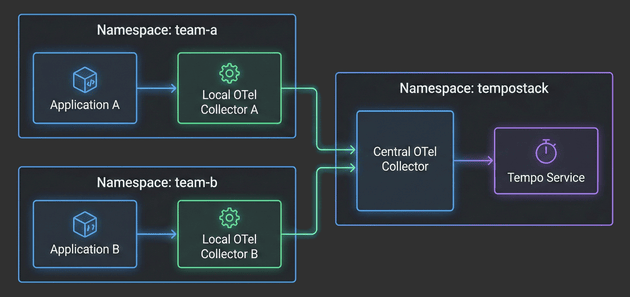
In this fourth installment, we’ll focus on the application layer - deploying Local OpenTelemetry Collectors in team namespaces and configuring example applications to generate traces. You’ll see how applications automatically get enriched with Kubernetes metadata, how namespace-based routing directs traces to the correct TempoStack tenants, and how the entire two-tier architecture comes together.
The Hitchhiker's Guide to Observability - Central Collector - Part 3
With the architecture defined in Part 1 and TempoStack deployed in Part 2, it’s time to tackle the heart of our distributed tracing system: the Central OpenTelemetry Collector. This is the critical component that sits between your application namespaces and TempoStack, orchestrating trace flow, metadata enrichment, and tenant routing.

The Hitchhiker's Guide to Observability - Grafana Tempo - Part 2
After covering the fundamentals and architecture in Part 1, it’s time to get our hands dirty! This article walks through the complete implementation of a distributed tracing infrastructure on OpenShift.
We’ll deploy and configure the Tempo Operator and a multi-tenant TempoStack instance. For S3 storage we will use the integrated OpenShift Data Foundation. However, you can use whatever S3-compatible storage you have available.
The Hitchhiker's Guide to Observability Introduction - Part 1
With this article I would like to summarize and, especially, remember my setup. This is Part 1 of a series of articles that I split up so it is easier to read and understand and not too long. Initially, there will be 6 parts, but I will add more as needed.
What's new in OpenShift, 4.20 Edition
 Toni Schmidbauer
This article covers news and updates in the OpenShift 4.20 release. We focus on points that got our attention, but this is not a complete summary of the release notes.
Red Hat Quay Registry - Integrate Keycloak
This guide shows you how to configure Keycloak as an OpenID Connect (OIDC) provider for Red Hat Quay Registry. It covers what to configure in Keycloak, what to put into Quay’s config.yaml (or Operator config), how to verify the login flow, and how to switch your Quay initial/admin account (stored locally in Quay’s DB) to an admin user that authenticates via Keycloak.
A second look into the Kubernetes Gateway API on OpenShift
This is our second look into the Kubernetes Gateway API an it’s integration into OpenShift. This post covers TLS configuration.
The Kubernetes Gateway API is new implementation of the ingress, load balancing and service mesh API’s. See upstream for more information.
Also the OpenShift documentation provides an overview of the Gateway API and it’s integration.
We demonstrate how to add TLS to our Nginx deployment, how to implement a shared Gateway and finally how to implement HTTP to HTTPS redirection with the Gateway API. Furthermore we cover how HTTPRoute objects attach to Gateways and dive into ordering of HTTPRoute objects.
A first look into the Kubernetes Gateway API on OpenShift
This blog post summarizes our first look into the Kubernetes Gateway API and how it is integrated in OpenShift.
[Ep.14] Reusable Argo CD Application Template
When working with Argo CD at scale, you often find yourself creating similar Application manifests repeatedly. Each application needs the same basic structure but with different configurations for source repositories, destinations, and sync policies. Additionally, managing namespace metadata becomes tricky when you need to conditionally control whether Argo CD should manage namespace metadata based on sync options.
In this article, I’ll walk you through a reusable Helm template that solves these challenges by providing a flexible, DRY (Don’t Repeat Yourself) approach to creating Argo CD Applications. This template is available in my public Helm Chart library and can easily be used by anyone.
Copyright © 2020 - 2026 Toni Schmidbauer & Thomas Jungbauer