The Guide to OpenBao - Secrets Engines PKI - Part 9
March 26, 2026
-
 Thomas Jungbauer
-
16 min read
(3246 words)
Thomas Jungbauer
-
16 min read
(3246 words)
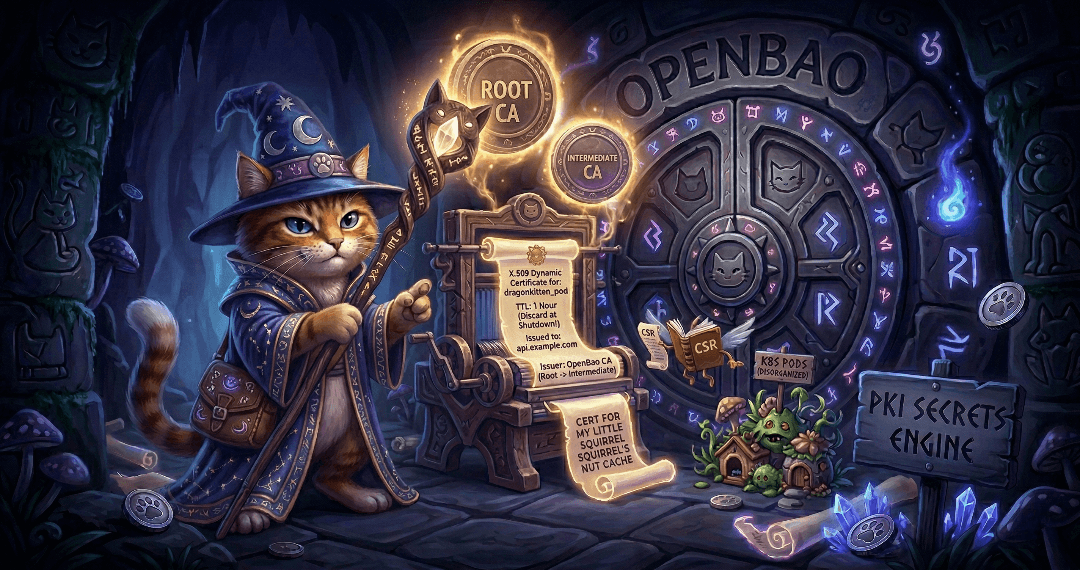
Secrets engines are one of the most important concepts in OpenBao. Part 8 covered the KV secrets engine; this article covers the PKI secrets engine and its integration with cert-manager on Kubernetes and OpenShift.
Quick Navigation
Navigate directly to the main sections of this article:
Introduction
Part 8 of this series explained the basics of secrets engines and the KV secrets engine. This article focuses on the PKI secrets engine and on integrating OpenBao with cert-manager.
| As a reminder: to log in to the OpenBao CLI, use the following (assuming HTTPS and a CA certificate available locally): |
export BAO_ADDR='https://127.0.0.1:8200'
export BAO_CACERT="$PWD/openbao-ca.crt"
bao login
PKI Secrets Engine
The PKI engine dynamically generates X.509 certificates, acting as a Certificate Authority (CA). You can obtain a certificate without manually generating a private key and CSR on the client: OpenBao provisions the key material and signed certificate according to the role.
The time to live (TTL) of each generated certificate can be kept short to reduce reliance on revocation. It is possible to store the certificates in memory during the startup of an application and discard them when the application shuts down. This way, a certificate is only valid during the application runtime, is kept in memory and is never written to disk.
Setting Up PKI Secrets Engine (Root CA)
Before we can use the PKI secrets engine, we need to enable and configure it. To enable it, we can simply use the following command:
bao secrets enable -path=pki pkiThis will enable the PKI secrets engine at the path pki/. If the path parameter is not provided, the engine will use the name of the engine as path.
The default value of the TTL is 30 days. To increase the maximum lease time for certificates issued under this mount, use
-max-lease-ttl=87600h(or another duration).
| Note that individual roles can restrict this value to be shorter on a per-certificate basis. This just configures the global maximum for this secrets engine. Source: PKI secrets engine - setup and usage |
Next we need to provide a CA certificate and a private key. OpenBao can either generate its own self-signed root certificate, or can use an existing one. Using an existing one is recommended for production environments. This is managed outside of OpenBao and OpenBao is provided with a signed intermediate CA.
We can simply generate a self-signed root certificate by using the following command:
bao write pki/root/generate/internal \
  common_name="Example Root CA" \ (1)
  issuer_name="root-ca" \ (2)
  ttl=8760h \ (3)
  key_bits=4096 \ (4)
1 Common name of the root certificate 2 Issuer name of the root certificate 3 Time to live of the root certificate, here 8760 hours (365 days) 4 Key bits of the root certificate, here 4096 bits (default is 2048 bits) The response will look something like:
Key              Value
---              -----
certificate      -----BEGIN CERTIFICATE-----...
expiration       1536807433
issuing_ca       -----BEGIN CERTIFICATE-----...
serial_number    7c:f1:fb:2c:6e:4d:99:0e:82:1b:08:0a:81:ed:61:3e:1d:fa:f5:29
The certificate key is stored in OpenBao. The returned certificates are purely informational. Set URL configuration
The location of the Certificate Revocation List (CRL) and the issuing certificate are stored in the configuration of the PKI secrets engine and must be updated manually.
# Configure CA and CRL URLs
bao write pki/config/urls \
  issuing_certificates="https://openbao.example.com/v1/pki/ca" \
  crl_distribution_points="https://openbao.example.com/v1/pki/crl"
Configure a Role
Now we need to define a role for the certificates. Roles define the allowed domains and the maximum time to live for the certificates. The following example creates a role for server certificates. It allows us to issue certificates for the domains
example.comandinternal.example.comwith a maximum time to live of 720 hours (30 days) and a key size of 2048 bits.bao write pki/roles/server-cert \ allowed_domains="example.com,internal.example.com" \ (1) allow_subdomains=true \ (2) max_ttl=720h \ key_bits=2048 \ (3) key_type=rsa \ (4) require_cn=false \ allow_any_name=false1 Allowed domains 2 Allow subdomains 3 Key size 4 Key type, typically rsa or ec (elliptic curve) Issuing Certificates
OpenBao is now ready to issue certificates. We will use the
issueendpoint to request a new certificate. The following example requests a new certificate for the domainmyapp.example.comand the subdomainmyapp.internal.example.comwith a maximum time to live of 168 hours (7 days) and a key size of 2048 bits.bao write pki/issue/server-cert \ common_name="myapp.example.com" \ alt_names="myapp.internal.example.com" \ ttl=168h \This will return the full certificate chain including the root CA certificate and the key. For better readability, the output was shortened to show the certificate only:
Key                 Value
---                 -----
certificate         -----BEGIN CERTIFICATE-----
MIIE7zCCAtegAwIBAgIUH0eTVpXCP7iu0Y75dWAvjktbyxcwDQYJKoZIhvcNAQEL
BQAwGjEYMBYGA1UEAxMPRXhhbXBsZSBSb290IENBMB4XDTI2MDMyMjA1MjEyNVoX
DTI2MDMyOTA1MjE1NFowHDEaMBgGA1UEAxMRbXlhcHAuZXhhbXBsZS5jb20wggEi
MA0GCSqGSIb3DQEBAQUAA4IBDwAwggEKAoIBAQDliY0K3qb8TwNBXOHdfBygs5+Y
Pwh83vtS0Nph6ZsPdI9JTuvI6AbzEz6M283aY7OeJ3m3G2fRwt7ZdgsAcyt+jnL8
Izx/MS/4ztsdZJ/wxs3M42/iFehSofqihgorY1+SGaTdveCFg9H7Egjn1eJFnGB/
iqANzxg5NohE4gf8zpAKDjl4CIPDSmNJX2xQ+3wXJgx1eKeVOeB0jFnMSYskS0hD
qwM+QyYRKodc/akI6Xu7OqWQLMW7qmNS+6TBHsGOopve9EP6ym65Jss6de4X9zIP
BYeWQ0gvG18i22eJrkISRWlO2uw+Fbho0tBhqfRfjsVpxrUrTKwIgxg+F0+5AgMB
AAGjggEpMIIBJTAOBgNVHQ8BAf8EBAMCA6gwHQYDVR0lBBYwFAYIKwYBBQUHAwEG
CCsGAQUFBwMCMB0GA1UdDgQWBBRbFm9oqRl//tc+Z0ert4DKp9KjkDAfBgNVHSME
GDAWgBSL03nIIcEY+IAz/1g2q5NBbufx9DBBBggrBgEFBQcBAQQ1MDMwMQYIKwYB
BQUHMAKGJWh0dHBzOi8vb3BlbmJhby5leGFtcGxlLmNvbS92MS9wa2kvY2EwOAYD
VR0RBDEwL4IRbXlhcHAuZXhhbXBsZS5jb22CGm15YXBwLmludGVybmFsLmV4YW1w
bGUuY29tMDcGA1UdHwQwMC4wLKAqoCiGJmh0dHBzOi8vb3BlbmJhby5leGFtcGxl
LmNvbS92MS9wa2kvY3JsMA0GCSqGSIb3DQEBCwUAA4ICAQBUoLwWgpTaodRKpL3c
zp/yPgHNagZA8SQRLqKttywbHzfPNUSsC56XqfZnOHaq/gobNKrmirUAHPnXRUjO
Jd2+wXBO9aKqAhiy5is2ueNRo+C8IdPQpFNQ+5MW+G4FXJqSkvDUlT47mAoRkKUJ
nsjoV/xzHYKgw/YF7QZtmL8moM9W9Bhg3dB6KEaUvscpNn/9USfPquVLXOuQ/8Bs
6zQGijJUhb5gpRgGjmJhs0Oo/MkABxBUq2jFmvGWP0NklcJO7smtetx/RSrtyFZ0
X7zgMlD1yUy4DaHX13LhszAfercTFNodV/mAfEaJUrW+U9I97MzVg8QJvn9/AsaM
mWjfKHczhd9AzupOlogX8L3cdZxx9hkdD4NcR8tRb4QR5sOqzoBN7NfNpQ699b0F
kxESrHIysqBcx4dYjXLFsUqzRGm2sGZ4j1N8w1OZY/s0kfsG7RXpXJjwtQ2RwPo1
iSjbJ/VLjji2pz5BtVRtHiXnkoVtSD8QBpjCYqyHekXUArJCVkaDPzkB2MWNZXpk
2koi2fYa0U4x4ITqDsKeMpLvGAl2vqkp20lphXXqRwaAdNuEFd69YZ6qXzw/6GdI
TC/Ki7zApSvO0kJvMs9NILcHgDjpndCA/sMpG9iv4wFMpgYet9wc+dzPMXnHcj4o
PGbyb/WJomcxQMDuV1x1S1X2iA==
-----END CERTIFICATE-----
expiration          1774761714
issuing_ca          -----BEGIN CERTIFICATE-----
MIIFJTCCAw2gAwIBAgIUJde0eccC1TpbufxVsUBhZhq9hWwwDQYJKoZIhvcNAQEL
BQAwGjEYMBYGA1UEAxMPRXhhbXBsZSBSb290IENBMB4XDTI2MDMyMjA0NDI1OVoX
DTI2MDQyMzA0NDMyOVowGjEYMBYGA1UEAxMPRXhhbXBsZSBSb290IENBMIICIjAN
BgkqhkiG9w0BAQEFAAOCAg8AMIICCgKCAgEA1XGanJKZZYySc9+WCXuGp9MLMo/O
MCRAR0u+BQbmxaSBcFLsxfNdkB8Jcunx7RnaGZIJwYXNIy+tNejqwQfiah7pTwJq
SYnXcYqZAETJUFvdYygjs4MCeaebvogmBQcZRzxJNNPzUblYpVOhmSGLvZZ7Vs5F
zY9wsKUEc3c3fMhwbxe/n/KQzvT/VzXSrLOw54LTsG7GNnUIhkuKwNqkhXuVItDy
ps+3z7RG/hOAWN9vktqLybi/E/uTmUqpsMrHSg7EMjqJ2jP8FMyH9EARLRL9gUG3
XFFNhFzjjDKjFrMsTUyVr+9tp4ucCZaakP9ZhjN9R/6FCXXR1K/XTVhTgYkawPHd
+PJaXn2T7NOie+tChiZx5Sii2XZtDm7WMFfwb4xhOBV67pWCSWSjkKl/xIDSrdRj
qLtzVfP/wiSL4sL9fy7Pya2OBtF2d/bdXXQ54JbbRlw3eRP+y+ej63UD+OP602EE
bbzrGB+B7ozwnfCmNNBnF23GgVYtJPWfDvgjXicprvbgjpmQAjeFohA8IIC322w5
sFsYuDL46KEs/KREoHjQNo1pxHKnmITU5GIMmWWoPyidTZuNNc4qWM6cH5RAbJup
IBaJWcWAr4eZ8p7pZd1dMkWEld4tieLdoJv2ENK77rDhwrq8kz66Xw9/xDJ/Nuio
sw5sd3py6Ayz+ekCAwEAAaNjMGEwDgYDVR0PAQH/BAQDAgEGMA8GA1UdEwEB/wQF
MAMBAf8wHQYDVR0OBBYEFIvTecghwRj4gDP/WDark0Fu5/H0MB8GA1UdIwQYMBaA
FIvTecghwRj4gDP/WDark0Fu5/H0MA0GCSqGSIb3DQEBCwUAA4ICAQAJuRiReD46
H85vhc1wzg7JUy6k+q5aUA9iKOupGyYBtkvzniQzhouZGEP47AcWkbPNGqo/3yl+
SCUItkBfPjunBmzcAhhZqyxJJ1q/SgY21DBf3W7WB0yzPx+saCwEi74rf44HbslY
Gp9W9pv0NFDT1+lQGerp978ErGQZh2M8rrGFwhcHmx71/umZ9ju6xyaGRaoHba+Y
8bxhR11j/Zx/UGRQBpjdAe2+VuAHDGpHjd9ieQ45YgoyJYkjBbecXJFttcVnShwu
7rxu8HNV3fMjoa4M6TDaY4z8KDgzHChzQSRB085TJIZzcG+/4zpJredzLe+jEq0P
RAuFEx4FjpRqYQu08HUmepO0Vd8a2ut7WyIBOC5b+pM+55LaGDfDF6rt8H7g6G84
w/RYFP/w/elxp3T1cFgDXsuZ60mfK6SX5ZbH3ZGPN0+xF/VahncUWKSfxSaSjzRI
Eml/Aac22kgtbbtxf8Bn4tgtY30sxqQRVnldHKi02FxS+DNg3SZB1hIpw6myyUo0
XH/ZtyumDLkcCvKzz/KvQGDOWDBmaPfPOPfMgiFXryB+YFMfy75Bhm0+aE+GM8fP
sextO8kawYI62aCHiOClkm2qIBiFtbsNG2HMTL4HKaNDOh9vxesPD5EteVzxTvg4
Oyk8YPB4kGtloH569v2Fj2U24D6KRyqxvQ==
-----END CERTIFICATE-----
not_before          1774156885
That is it. We have just created our first certificate.
Setting Up an Intermediate CA
The test above demonstrated the usage of the PKI secrets engine to issue a certificate. However, the certificate was issued by the root CA. This is not practical or recommended for production environments. Instead, we should use an intermediate CA. The setup is very similar to the root CA, but with a few key differences: Instead of directly signing with the root CA, we will create a CSR (Certificate Signing Request) and sign it with the root CA. This can then be used to issue certificates with the intermediate CA.
First we enable the PKI secrets engine for the intermediate CA and tune it a little bit.
# Enable PKI engine for intermediate CA
bao secrets enable -path=pki_int pki

# Configure maximum lease time
bao secrets tune -max-lease-ttl=43800h pki_int
We set the maximum TTL of the intermediate CA to 43800 hours (5 years). It should be equal to or less than the root CA.
Generate a CSR (Certificate Signing Request)
# Generate intermediate CSR
bao write -format=json pki_int/intermediate/generate/internal \
  common_name="Example Intermediate CA" \
  issuer_name="intermediate-ca" \
  key_bits=4096 \
  | jq -r '.data.csr' > pki_int.csr
This will create the CSR and store it at
pki_int.csr, which can be signed by the root CA and then used to issue certificates with the intermediate CA. As an example, the following CSR is generated:-----BEGIN CERTIFICATE REQUEST----- MIIEZzCCAk8CAQAwIjEgMB4GA1UEAxMXRXhhbXBsZSBJbnRlcm1lZGlhdGUgQ0Ew ggIiMA0GCSqGSIb3DQEBAQUAA4ICDwAwggIKAoICAQC/dLEhNgiBeMiCIwrAq9S8 9m7SjqH59JaYPTBEpdAKCs1gsEBNROOaI+zftVaVJEGw/yi1gFRijTbjvBAbwAbc YDV5VYLXqaoetkSE2hhIbsX92xwwch++J3BkGrgLt5y6uK0gLfODLp0hbxTdGhO0 RvIBKa2X1ctSLgEscgAr8PrlIfDlzahcxDgxpQQsN/1CASW2X5i/DEj160rbODzG v10FEsVEcOLaJEee9qQ9yvwySiPLfH7KjEFV8qlQd/uY4gnGE8WW6nHhZEW+0Lsj h1iO0Y4GA2Yw60FtTxsGAQlTCE3xCZTajInwc0XgDIYBtj/PEJhQUNU7mamchqng jg+MJb9jzoqYmTw7dLvxTFTobu8s8y+7mjKQYevg7+FRNWQ467PmxGqaD++HQEw9 Ef1kaQ1Aw0L5ZuTZ2QaEzbJe2Rka5slHAja6rHxX2rNk6YkdbE2MfCUPqSVpqHBp I+ptF8b73EgjgKINpWRXKvqH4QX2f6zUpVbr+5AikbS9TmPLQRqHHKtO0uDFEQzn 38w9PntU/N29BrYhzkeCzdGNFZTcL+Yijnp7fKrHl+iYasIUQD+MGWR3sUqaOODc JmKvfl8H9UNulV4I7JXn0MBUUIT3uhTtsJ4Q62xr9pltZH5ijgR8Zqrl/q2kh+jf pCoA7CpUKZXSiSou0zG3lwIDAQABoAAwDQYJKoZIhvcNAQELBQADggIBAGBAEsLK QdeEejkFxP06xmEKypvGcy4GGw2g/ODp9lZQeNyaObwiABDjdJfj7CBgFGsPcMbq DAFq/Kt/f+BmQwRulQf6ers9OIC8+4HAgHF9olgYJSn+lsrNXT9M4m02orIAodey +xFxIcuUCHygQiXMIzb4QLzyvzW0/CqdsCysfbgHNN8P5deOR2/PseirYZKYFRQI /ZxQrjB2Uj9gBND1Q5ew97Gm+mVvhqnb1T/Y1aIS+iEdRXADjxIvdweOPBXj3pDY h8P+NgrP49pAKEvPuRFgfWMrkMrg4dQYPtVElcjN5XFMBXY2wZDketTu0rqroSlk tcEhcwHdFFi+ILq6UHBDtMhZBkFtJG/82FgjcnR1G+1UOwKGSFOJ0HGiZpYGOXtc hJM07eSZ0JzFCrg+2/geHM5c8X33yShe+4DRc3fi2KpsQbOAvvtH7Kb6AYwNu953 yBoOSpzI3Q9XjiFaAl1U8JDIr5DRfHGkUt1ozg4nf3ZHjPQC/NQNTq4XNEnjWgnJ kiC+Ss4YZ6QnfvQU3aIwU97WKG6PIb5x9v+5mBwQe6AgDn2T1mmfyumsFfu/7aTB 87BUt3lWesvuW67JvE95LKs8NukNTW8FETR/x3Kn8TSYMulvXJsv7yb8g+Mm8k5w f+LiteH/fEMVMYsoIdNL6MYJhiZNxStFDC2V -----END CERTIFICATE REQUEST-----Sign the CSR with the root CA
The CSR must now be signed using the root CA that was generated previously. Use:
bao write -format=json pki/root/sign-intermediate \
  csr=@pki_int.csr \ (1)
  format=pem_bundle \
  ttl=43800h \
  | jq -r '.data.certificate' > cert_bundle.pem (2)
1 The CSR file created in the previous step 2 The signed certificate is stored in the file cert_bundle.pemThis will sign the CSR with the root CA and store the signed certificate at
cert_bundle.pem.Configure the set-signed certificate
We need to configure the intermediate CA with the signed certificate, so we can issue new certificates:
bao write pki_int/intermediate/set-signed \
  certificate=@cert_bundle.pem
Creating Certificate Roles
Before we can issue certificates, we need to create roles. The following defines a role for server certificates and a role for client certificates, including allowed domains, maximum TTL, and key type.
# Create a role for issuing server certificates
bao write pki_int/roles/server-cert \
  allowed_domains="example.com,internal.example.com" \ (1)
  allow_subdomains=true \ (2)
  max_ttl=720h \
  key_bits=2048 \ (3)
  key_type=rsa \
  require_cn=false \
  allow_any_name=false

# Create a role for client certificates
bao write pki_int/roles/client-cert \
  allowed_domains="example.com" \ (1)
  allow_subdomains=true \
  max_ttl=168h \
  key_usage="DigitalSignature,KeyEncipherment" \
  ext_key_usage="ClientAuth"
1 The allowed domains, comma separated list 2 Allow subdomains, true or false 3 The key bits, 2048 or 4096 Check out the official documentation for more details of possible options: https://openbao.org/docs/ Issuing Certificates
Finally we can issue certificates. The example below issues a server certificate via the intermediate mount (and the article’s role setup supports a separate client role if you need mutual TLS).
# Issue a server certificate
bao write pki_int/issue/server-cert \
  common_name="myapp.example.com" \ (1)
  alt_names="myapp.internal.example.com" \ (2)
  ttl=168h
1 The common name, the subdomain under example.com is allowed. 2 The alternative names This will print a large amount of detail. Typical fields include:
certificateissuing_caprivate_keyserial_number
The output contains the full chain (intermediate and root CA), the leaf certificate, and the private key, which you can use to configure TLS in an application.
+ TIP: It can also be printed out in JSON format which is easier to process later.
+ The following example creates the JSON file with all the components.
+
bao write -format=json pki_int/issue/server-cert \
  common_name="api.example.com" \
  ttl=168h > api-cert.json
+
This can then be extracted to the individual components using the jq command.
+
cat /tmp/api-cert.json | jq -r '.data.certificate'
cat /tmp/api-cert.json | jq -r '.data.private_key'
cat /tmp/api-cert.json | jq -r '.data.ca_chain[]'
PKI Policies
Every OpenBao request is checked against the token’s policies; without an explicit allow, paths are denied.
PKI is split into several API paths (issue, sign, ca, crl, …), so you grant only what each client needs.
For example: operators using pki_int/issue/… need the issue path; cert-manager sending a CSR needs the sign path; workloads or validators that fetch trust material need read on the CA (and often the CRL) paths etc.
The example below is a single policy you can attach to a role or token; split into narrower policies in production if different actors should not share the same privileges.
set -e

cat <<'EOF' | bao policy write pki-int-workload -
# Allow issuing certificates with the server-cert role (CLI / API issue endpoint)
path "pki_int/issue/server-cert" {
  capabilities = ["create", "update"]
}

# Allow cert-manager (Vault issuer) to sign CSRs via the sign endpoint for the same role
path "pki_int/sign/server-cert" {
  capabilities = ["create", "update"]
}

# Allow reading CA certificate
path "pki_int/ca/pem" {
  capabilities = ["read"]
}

# Allow reading CRL
path "pki_int/crl/pem" {
  capabilities = ["read"]
}
EOF

bao policy read pki-int-workload
Integration with cert-manager
cert-manager requests TLS certificates inside Kubernetes and stores them in Secrets. It includes a Vault issuer that talks to HashiCorp Vault’s HTTP API; OpenBao exposes the same API for PKI and auth, so you can point that issuer at OpenBao instead of Vault.
cert-manager generates a private key and a CSR in the cluster, then calls the PKI sign endpoint for your role (not the issue endpoint you used from the CLI earlier).
The path in the issuer must therefore follow mount/sign/role-name, for example pki_int/sign/server-cert, matching the intermediate mount and role from this article.
Before the ClusterIssuer can log in to OpenBao, you need Kubernetes auth enabled, a policy that allows signing on pki_int (see PKI policies), and a role that binds the cert-manager controller’s service account to that policy.
Part 7 of this series walks through Kubernetes authentication in detail; the commands below are a minimal summary for cert-manager.
Enable the Kubernetes auth method
Skip this step if kubernetes is already listed under bao auth list. |
bao auth enable --description="Kubernetes/OpenShift service account auth" kubernetesConfigure the Kubernetes auth method
OpenBao’s server validates incoming service-account JWTs by calling the Kubernetes TokenReview API.
If OpenBao runs inside the cluster (the setup assumed here), configure auth/kubernetes with:
kubernetes_host— API URL reachable from the OpenBao pods (typicallyhttps://kubernetes.default.svc:443).kubernetes_ca_cert— PEM of the cluster CA that signs the API server certificate (same material as in the service-account token Secret).token_reviewer_jwt— long-lived JWT for a dedicated service account that may create TokenReview objects (viasystem:auth-delegator).
If OpenBao runs outside the cluster, use your public API URL for kubernetes_host (for example $(oc whoami --show-server)), the same CA and reviewer JWT extracted from the cluster, and ensure the OpenBao process can reach that URL on the network.
In-cluster example: reviewer service account and Secret
Create a service account in the OpenBao namespace (here openbao), bind system:auth-delegator, and request a long-lived token Secret (required from Kubernetes 1.24 onward unless you use another token source).
---
apiVersion: v1
kind: ServiceAccount
metadata:
  name: openbao-kube-auth
  namespace: openbao (1)
---
apiVersion: rbac.authorization.k8s.io/v1
kind: ClusterRoleBinding
metadata:
  name: openbao-kube-auth-delegator
roleRef:
  apiGroup: rbac.authorization.k8s.io
  kind: ClusterRole
  name: system:auth-delegator (2)
subjects:
  - kind: ServiceAccount
    name: openbao-kube-auth
    namespace: openbao
---
apiVersion: v1
kind: Secret
metadata:
  name: openbao-kube-auth-token
  namespace: openbao
  annotations:
    kubernetes.io/service-account.name: openbao-kube-auth
type: kubernetes.io/service-account-token (3)| 1 | The namespace of the OpenBao service account |
| 2 | The name of the ClusterRole that binds the service account to the system:auth-delegator role |
| 3 | The type of the Secret, which is a long-lived token Secret |
Save the YAML manifest to a file (for example openbao-kube-auth.yaml), apply it, then wait until the Secret contains a token (the control plane fills data.token—often within a few seconds).
oc apply -n openbao -f openbao-kube-auth.yaml

until oc get secret openbao-kube-auth-token -n openbao -o jsonpath='{.data.token}' | grep -q .
do
  sleep 2
done
You can manage the reviewer service account, ClusterRoleBinding, and token Secret through GitOps so the configuration stays reproducible. |
Configure auth/kubernetes/config
Dump the reviewer JWT and CA to files and configure the Kubernetes auth backend. Use the in-cluster API URL so OpenBao pods reach the Kubernetes API without relying on the external load balancer.
TMP=$(mktemp -d) (1)
trap 'rm -rf "$TMP"' EXIT

oc get secret openbao-kube-auth-token -n openbao -o jsonpath='{.data.token}' | base64 -d > "$TMP/reviewer.jwt" (2)
oc get secret openbao-kube-auth-token -n openbao -o jsonpath='{.data.ca\.crt}' | base64 -d > "$TMP/k8s-ca.crt" (3)

bao write auth/kubernetes/config \ (4)
  kubernetes_host="https://kubernetes.default.svc:443" \
  kubernetes_ca_cert=@"$TMP/k8s-ca.crt" \
token_reviewer_jwt=@"$TMP/reviewer.jwt"| 1 | Create a temporary directory to store the reviewer JWT and CA and remove it after the script exits |
| 2 | Get the reviewer JWT from the Secret |
| 3 | Get the CA from the Secret |
| 4 | Write the configuration to the auth/kubernetes/config path using the internal API URL of the Kubernetes cluster. |
On plain Kubernetes, replace oc with kubectl and the same Secret paths. |
If logins fail after cluster upgrades or with projected service-account tokens, check whether you must set issuer or related options; see OpenBao Kubernetes auth and Part 7. |
To inspect the stored Kubernetes auth backend configuration:
bao read auth/kubernetes/configYou should see kubernetes_host and kubernetes_ca_cert; token_reviewer_jwt is often omitted or redacted on read.
Policy and role for cert-manager
Attach a policy (here cert-manager-pki) that matches the PKI paths cert-manager uses—aligned with PKI policies—then map the controller’s service account to that policy.
Adjust bound_service_account_names and bound_service_account_namespaces if your cert-manager installation does not use the cert-manager service account in the cert-manager namespace. |
bao policy write cert-manager-pki - <<'EOF'
path "pki_int/sign/server-cert" {
  capabilities = ["create", "update"]
}

path "pki_int/ca/pem" {
  capabilities = ["read"]
}

path "pki_int/crl/pem" {
  capabilities = ["read"]
}

path "auth/token/renew-self" {
  capabilities = ["update"]
}
EOF

bao write auth/kubernetes/role/cert-manager \
  bound_service_account_names=cert-manager \
  bound_service_account_namespaces=cert-manager \
  policies=cert-manager-pki \
  ttl=1h \
  max_ttl=24h
Verify with a Kubernetes login (optional)
After the cert-manager auth role exists, prove that OpenBao accepts the same service-account identity cert-manager will use. Request a short-lived projected token for that service account, then log in to the Kubernetes auth method:
JWT=$(oc create token cert-manager -n cert-manager --duration=15m)

bao write -format=json auth/kubernetes/login role=cert-manager jwt="$JWT" \
  | jq -r '.auth.client_token'
A printed client token means TokenReview and role binding succeeded.
Configure the (Cluster)Issuer for cert-manager
To integrate cert-manager with OpenBao we need to configure either a ClusterIssuer (cluster-wide) or an Issuer (namespace-scoped). The setup is very similar.
The ClusterIssuer manifest below must use the same OpenBao role name in spec.vault.auth.kubernetes.role (here cert-manager).
The server URL in the issuer must be reachable from the cert-manager pods (in-cluster Service DNS is typical), for example https://openbao.openbao.svc:8200.
The following is an example of a ClusterIssuer manifest.
apiVersion: cert-manager.io/v1
kind: ClusterIssuer
metadata:
  name: openbao-cluster-issuer
spec:
  vault:
    path: pki_int/sign/server-cert (1)
    server: https://openbao.openbao.svc:8200 (2)
    caBundle: LS0tLS1CRUdJTi... (3)
    auth:
      kubernetes:
        role: cert-manager
        mountPath: /v1/auth/kubernetes (4)
        serviceAccountRef:
name: cert-manager (5)| 1 | PKI sign path for the OpenBao role (mount/sign/role-name). |
| 2 | OpenBao Service URL as seen from cert-manager pods. |
| 3 | Required for private / self-signed OpenBao TLS: single-line base64 of the PEM CA (see the command block below). Omit only if the server uses a public CA trusted by default in the cert-manager image. |
| 4 | Kubernetes auth mount path in OpenBao (default is /v1/auth/kubernetes). |
| 5 | Name of the cert-manager controller service account only. Do not add namespace under serviceAccountRef; it is not part of the cert-manager API. |
If OpenBao’s HTTPS certificate is not signed by a CA already trusted inside the cert-manager pods, you must supply trust material; otherwise TLS verification fails with x509: certificate signed by unknown authority.
Use caBundle (base64-encoded PEM of the CA that signed OpenBao’s server certificate) or caBundleSecretRef pointing to a Secret in the cert-manager namespace.
Fetch the certificate OpenBao is using:
oc get secret openbao-server-tls -n openbao -o jsonpath='{.data.ca\.crt}{"\n"}'| This secret was created in a previous article, when we were setting up the OpenBao server. |
The returned string must be added to the ClusterIssuer manifest as the value of the caBundle field.
Alternatively, copy the CA PEM into a Secret in the cert-manager namespace and reference it (no giant line in the issuer):
# spec.vault fragment — use instead of caBundle if you prefer
    caBundleSecretRef:
      name: openbao-ca
      key: ca.crt
However, this requires that the Secret exists in the appropriate namespace. For ClusterIssuer, the Secret must be in the cert-manager namespace.
Once the ClusterIssuer is created and is ready, we can issue a certificate.
Issue a Certificate
With the ClusterIssuer in place, create a Certificate in the workload namespace (here myapp, this namespace must exist).
cert-manager will create a TLS Secret (myapp-tls below) containing tls.crt and tls.key, and renew the cert before it expires according to renewBefore.
apiVersion: cert-manager.io/v1
kind: Certificate
metadata:
  name: myapp-tls
  namespace: myapp (1)
spec:
  secretName: myapp-tls (2)
  issuerRef: (3)
    name: openbao-cluster-issuer
    kind: ClusterIssuer
  commonName: myapp.example.com (4)
  dnsNames:
    - myapp.example.com
  duration: 168h (5)
  renewBefore: 48h (6)
  privateKey:
rotationPolicy: Always (7)| 1 | The namespace of the workload |
| 2 | The name of the TLS Secret |
| 3 | The issuer of the certificate |
| 4 | The common name of the certificate |
| 5 | The duration of the certificate |
| 6 | The duration before the certificate is renewed |
| 7 | Explicit rotation policy: Always matches cert-manager ≥ v1.18 default (new key each renewal). Set Never only if you rely on a stable key across renewals. |
The values you set in commonName and dnsNames must be allowed by the OpenBao PKI role (allowed_domains, allow_subdomains, allow_bare_domains, and related settings). |
If the Certificate never reaches Ready=True, check kubectl describe certificate / kubectl describe certificaterequest (or the same with oc describe on OpenShift) in that namespace, the cert-manager controller logs, and the OpenBao audit log for 403 policy denials or CSR rejection messages from the PKI engine. |
When everything is working, a Secret named myapp-tls is created in the myapp namespace containing tls.crt and tls.key.
oc describe secret/myapp-tls -n myapp

[source,bash]
----
Name:         myapp-tls
Namespace:    myapp
[...output omitted...]
Type:  kubernetes.io/tls

Data
====
tls.key:  1679 bytes
ca.crt:   1846 bytes
tls.crt:  3631 bytes
Conclusion
This part showed how to turn OpenBao into a usable CA for cluster workloads and how to automate TLS with cert-manager.
You should now be able to:
Enable the PKI engine, set CA and CRL URLs, define roles, and issue certificates via the
issueAPI (CLI or automation).Stand up an intermediate CA signed by the root, and keep day-to-day issuance on the intermediate mount (
pki_int).Express least-privilege with policies that separate
issuefromsign, and allow CA/CRL reads where validators or clients need them.Wire cert-manager to OpenBao’s Vault-compatible API: Kubernetes auth in-cluster (reviewer JWT and CA), a ClusterIssuer with
caBundle(orcaBundleSecretRef) for private OpenBao TLS,serviceAccountRef.nameonly (nonamespacefield), and a Certificate with an explicitprivateKey.rotationPolicyfor cert-manager ≥ v1.18.
Resources
Related Articles



Copyright © 2020 - 2026 Toni Schmidbauer & Thomas Jungbauer
Discussion
Comments are powered by GitHub Discussions. To participate, you'll need a GitHub account.
By loading comments, you agree to GitHub's Privacy Policy. Your data is processed by GitHub, not by this website.