The Guide to OpenBao - Secrets Engines KV - Part 8
March 25, 2026
Updated Mar 26, 2026
-
 Thomas Jungbauer
-
8 min read
(1639 words)
Thomas Jungbauer
-
8 min read
(1639 words)
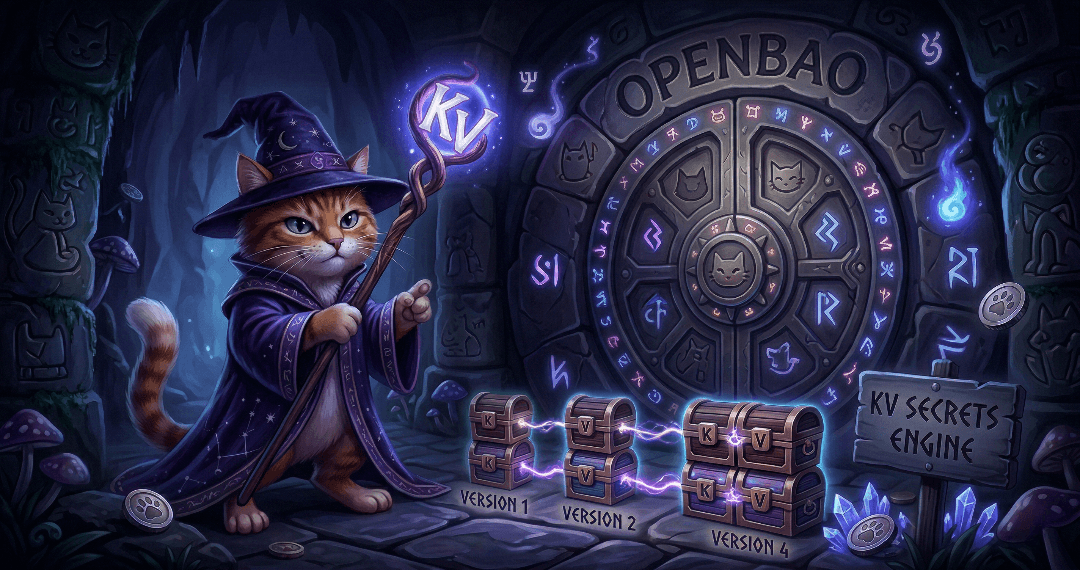
Secrets engines are the heart of OpenBao’s functionality. They store, generate, or encrypt data. This article covers the most commonly used secrets engine: KV for static secrets. It will demonstrate how to use the KV secrets engine to store and retrieve secrets. Upcoming articles will cover the PKI secrets engine and the integration with cert-manager.
Introduction
Secrets engines are components which store, generate, or encrypt data. Some engines simply store and read data, others connect to other services and other engines provide encryption as a service.
They are enabled at a path in OpenBao (as everything is done as a path in OpenBao). This means each secrets engine defines its very own path including properties.
| The path is case-sensitive. For example, the KV secrets engine enabled at kv/ and KV/ are treated as two distinct instances of KV secrets engine. |
The management of the secret engines is done via the CLI or API or, if enabled, the UI. Engines can be enabled, disabled, moved or tuned.
Enable - enables a secrets engine at the given path.
Disable - disables an existing secrets engine. All existing secrets are revoked and the data is deleted.
Move - moves the path for an existing secrets engine.
Tune - tunes global configuration for the secrets engine such as the TTLs.
List of Secrets Engines
To list all enabled secrets engines, we can use the following command:
bao secrets listWhich will output something like:
Path          Type         Accessor              Description
----          ----         --------              -----------
cubbyhole/    cubbyhole    cubbyhole_f8b1e784    per-token private secret storage
identity/     identity     identity_76940581     identity store
secret/       kv           kv_ccb47c73           n/a
sys/ system system_cb0d64b7 system endpoints used for control, policy and debugging| As a reminder: To login to the OpenBao CLI, we can use the following command (assuming that you are using HTTPS and have the CA certificate ready): |
export BAO_ADDR='https://127.0.0.1:8200'
export BAO_CACERT="$PWD/openbao-ca.crt"
bao login
KV (Key-Value) Secrets Engine
The KV secrets engine is probably the most commonly used engine. It is a generic key-value store. When you work with KV secrets engine you will note very soon that there are two versions of the engine: KV v1 and KV v2.
KV Version 1
KV v1 is the older version of the KV secrets engine. It does not support versioning and only stores the recently written value for a key. Requests to this engine will be more performant because the storage requests will be fewer and no locking is required. The storage as such will be much smaller, since it does not need to retain any history.
KV Version 2
KV v2 on the other hand supports versioning of secrets. When a version is deleted, the underlying data is not removed, instead you must destroy it intentionally. Storing the history of secrets will increase the required storage space. However, I would recommend using KV v2 in most cases as the benefit of versioning is too great to ignore.
| The following example will use KV v2. |
KV Version 1 vs Version 2
| Feature | Version 1 | Version 2 |
|---|---|---|
Versioning | No | Yes (up to 10 versions by default) |
Check-and-Set | No | Yes (prevents concurrent writes) |
Soft delete | No | Yes (recoverable) |
Metadata | No | Yes (custom metadata) |
| KV v1 can be upgraded to KV v2 by using the following command as described in the documentation: Upgrading from version 1 |
Enabling KV Engine
Let’s enable the KV v2 engine at the path secret/ and give it the description "Application secrets".
| This path was used in Part 7 of this series already. So you might have to remove or rename the engine first if you have already enabled it. |
bao secrets enable \
  -path=secret \ (1)
  -version=2 \ (2)
  -description="Application secrets" \
kv (3)| 1 | Path where the secrets will be stored |
| 2 | Version of the engine in case of KV |
| 3 | Name of the engine |
Storing Secrets
With the enabled engine, we can now store secrets at the path:
# Put a secret (KV v2)
bao kv put secret/myapp/database \ (1)
  username="dbadmin" \ (2)
  password="supersecret123" \
  host="db.example.com" \
port="5432"| 1 | Path where the secret will be stored |
| 2 | Secret data |
Which will output something like:
======= Secret Path =======
secret/data/myapp/database (1)

======= Metadata =======
Key                Value
---                -----
created_time       2026-03-13T05:56:52.670296216Z
custom_metadata    <nil>
deletion_time      n/a
destroyed          false
version 1 (2)| 1 | Path where the secret will be stored |
| 2 | Version of the secret |
Reading Secrets
To read the secret, we can use one of the following commands:
# Read a secret
bao kv get secret/myapp/database
Which will output something like:
======= Secret Path =======
secret/data/myapp/database (1)

[... more metadata ...]

====== Data ====== (2)
Key         Value
---         -----
host        db.example.com
password    supersecret123
port        5432
username dbadmin| 1 | Path where the secret will be stored |
| 2 | Secret data |
As an alternative, we can use the following command to get the secret as JSON:
# Get as JSON
bao kv get -format=json secret/myapp/database
We can also read a specific existing version of the secret by using the following command:
# Read specific version
bao kv get -version=2 secret/myapp/database
Or simply, a specific field:
# Get specific field
bao kv get -field=password secret/myapp/database
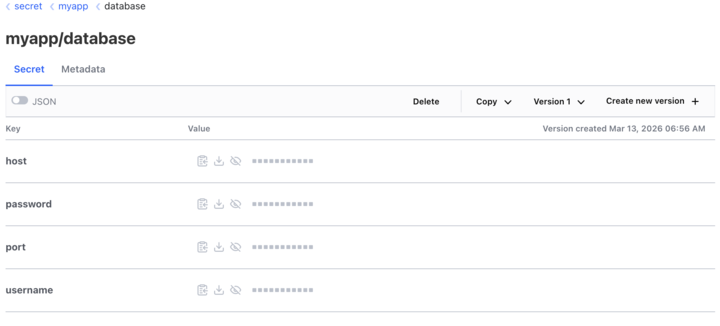
If the UI is enabled, the same can be achieved via the browser:
Managing Versions
KV v2 keeps a version history. This is a big advantage over KV v1. To try version management, ensure the secret has at least two versions. Create a second version by writing to the same path again (e.g. with updated values):
bao kv put secret/myapp/database username=dbadmin password=newpassword456 port=5432 (1)| 1 | Updating an existing secret with a new password, which will create a new version in KV v2. |
Now you can list versions, soft-delete, undelete, or destroy a specific version:
| I will only paste the output of the first command. The rest will be similar … you’ll get the idea. |
# List all versions and metadata
bao kv metadata get secret/myapp/database
Which will output something like:
====== Version 1 ====== (1)
Key              Value
---              -----
created_time     2026-03-13T05:56:52.670296216Z
deletion_time    n/a
destroyed        false

====== Version 2 ====== (2)
Key              Value
---              -----
created_time     2026-03-13T06:13:18.539285992Z
deletion_time    n/a
destroyed false| 1 | Version 1 |
| 2 | Version 2 |
Specific versions can now be (soft-) deleted, permanently destroyed etc.
| The last command of the list will completely delete all versions and metadata for a given path aka the secret is gone. |
# Delete specific version (soft delete)
bao kv delete -versions=2 secret/myapp/database

# Undelete a version
bao kv undelete -versions=2 secret/myapp/database

# Permanently destroy a version
bao kv destroy -versions=2 secret/myapp/database

# Delete all versions and metadata
bao kv metadata delete secret/myapp/database| When you define a secret you can set the maximum number of versions to keep using the flag -max-versions=5. This is the number of versions that will be kept in the history. |
Custom Metadata
A secret’s key metadata can contain multiple custom metadata that can be used to describe the secret. The data will be stored as key-value pairs. Imagine them like labels in Kubernetes.
Let’s extend our secret with some custom metadata:
# Add custom metadata to a secret
bao kv metadata put \
  -custom-metadata="owner=team-a" \ (1)
  -custom-metadata="environment=production" \ (2)
secret/myapp/database| 1 | First custom metadata to set an owner label |
| 2 | Second custom metadata to set an environment label |
Policies for KV v2
OpenBao policies control which authenticated clients may access which paths and with what actions. For the KV v2 secrets engine, any read or write via the API is checked against the token’s policies; without a policy granting the right capabilities, requests return 403. This section shows example policy rules you can attach to roles (e.g. Kubernetes auth roles) or tokens so that applications and users have the minimum access they need.
KV v2 exposes two logical path trees under the mount path (here secret/):
secret/data/<path>— Secret values. Use capabilities such asread,create,update, anddeletefor reading and writing secret data.secret/metadata/<path>— Version and metadata. Uselistto enumerate keys, andread/deletefor version metadata and destroying versions.
The following example grants read-only access to all secrets under myapp/, plus full read/write (including create, update, delete) for the single path myapp/database. Replace myapp with your application or team prefix as needed.
# Note: KV v2 uses /data/ for values and /metadata/ for metadata

# Read secret values under myapp/
path "secret/data/myapp/*" {
  capabilities = ["read"]
}

# List secret keys under myapp/ (required for listing, e.g. bao kv list secret/myapp)
path "secret/metadata/myapp/*" {
  capabilities = ["list"]
}

# Full access to a specific secret (create, read, update, delete)
path "secret/data/myapp/database" {
  capabilities = ["create", "read", "update", "delete"]
}

# Read and delete version metadata for this secret (e.g. destroy version)
path "secret/metadata/myapp/database" {
  capabilities = ["read", "list", "delete"]
}
After writing the policy to OpenBao (e.g. bao policy write myapp-kv policy.hcl), attach it to the appropriate auth method role or token so that clients receive a token with this policy. For token renewal, ensure the role or token also has update on auth/token/renew-self if you use renewable tokens.
| Part 7 of this series (Authentication Methods) explains the authentication methods and policies in more detail. |
Conclusion
This part focused on the KV secrets engine: enabling a mount, storing and reading secrets, version lifecycle (list, soft delete, destroy), custom metadata, and policies that distinguish KV v2’s data/ and metadata/ paths.
Key takeaways:
Prefer KV v2 when you need versioning, check-and-set, soft delete, and richer metadata; use KV v1 only when you explicitly want the simpler, lower-overhead path.
Grant
secret/data/…for secret values andsecret/metadata/…for listing and version operations—policies must match how the CLI and API resolve KV v2 paths.Attach policies to tokens or auth roles (for example Kubernetes auth) so applications receive least-privilege access; include
auth/token/renew-selfif tokens should be renewable.
The PKI secrets engine and integration with cert-manager are covered in the next article in this series.
Resources
Related Articles



Copyright © 2020 - 2026 Toni Schmidbauer & Thomas Jungbauer
Discussion
Comments are powered by GitHub Discussions. To participate, you'll need a GitHub account.
By loading comments, you agree to GitHub's Privacy Policy. Your data is processed by GitHub, not by this website.