The Guide to OpenBao - OpenShift Deployment with Helm - Part 3
February 13, 2026
Updated Feb 16, 2026
-
 Thomas Jungbauer
-
10 min read
(1959 words)
Thomas Jungbauer
-
10 min read
(1959 words)

After understanding standalone installation in Part 2, it is time to deploy OpenBao on OpenShift/Kubernetes using the official Helm chart. This approach provides high availability, Kubernetes-native management, and seamless integration with the OpenShift ecosystem.
Introduction
Deploying OpenBao on OpenShift/Kubernetes offers several advantages:
High Availability: Multiple replicas with automatic failover
Kubernetes-native: Managed by standard Kubernetes primitives
Persistent Storage: Data survives pod restarts via PVCs
Integration: Works with Kubernetes service accounts for authentication
Scalability: Easy to scale and manage
The official OpenBao Helm chart supports multiple deployment modes:
Dev: Single server, in-memory storage (testing only)
Standalone: Single server, persistent storage
HA: Multiple servers with Raft consensus (recommended)
External: Connect to external OpenBao cluster
Integrations
Currently, OpenBao supports the following integrations that help seamlessly load secrets into applications without the need to modify the application code:
Agent Injector: A mutating webhook that automatically injects a sidecar container that retrieves and renews secrets.
CSI Provider: A (vendor neutral) CSI driver that mounts secrets as volumes.
Prerequisites
Before deploying, ensure you have:
OpenShift 4.12+ or Kubernetes 1.30+
Helm 3.6+
ocorkubectlCLI configuredThe OpenBao CLI (
bao) for initialization and unsealing (see OpenBao installation)Cluster-admin privileges (for initial setup)
A storage class that supports ReadWriteOnce PVCs
# Verify prerequisites
oc version
helm version

# Check available storage classes
oc get storageclass
Adding the Helm Repository
First, add the OpenBao Helm repository:
# Add the OpenBao Helm repository
helm repo add openbao https://openbao.github.io/openbao-helm

# Update repository cache
helm repo update

# Search for available charts
helm search repo openbao

# Expected output:
# NAME            CHART VERSION   APP VERSION     DESCRIPTION
# openbao/openbao 0.x.x 2.x.x Official OpenBao Helm chart| According to the official documentation, the Helm chart is new and under significant development. It should always be run with --dry-run before any install or upgrade to verify changes. |
Creating the Namespace
Create a dedicated namespace for OpenBao:
| While I am using the oc CLI, you can also use the kubectl CLI as in-place replacement. |
oc new-project openbaoDeployment Mode: High Availability (Recommended)
For production environments, deploy in HA mode with Raft. This is the recommended deployment mode for production and is straightforward to achieve on Kubernetes and OpenShift. The following values definitions will use OpenShift specific settings. I will mark them in the callouts.
We will first create a values file, deploy openbao and then discuss what must be done to activate all OpenBao pods.
Create HA Values File
Create openbao-ha-values.yaml:
| The values file is based on the official values file from that chart, but only modified values or important changes are listed here. |
global:
  # Enable OpenShift-specific settings
  openshift: true (1)

server:
  # High Availability configuration
  ha:
    enabled: true (2)
    replicas: 3 (3)

    # Raft storage configuration
    raft:
      enabled: true (4)
      setNodeId: true

      config: | (5)
        ui = true

        listener "tcp" {
          tls_disable = 1
          address = "[::]:8200"
          cluster_address = "[::]:8201"
          telemetry {
            unauthenticated_metrics_access = "true"
          }
        }

        storage "raft" {
          path = "/openbao/data"

          retry_join {
            leader_api_addr = "http://openbao-0.openbao-internal:8200"
          }
          retry_join {
            leader_api_addr = "http://openbao-1.openbao-internal:8200"
          }
          retry_join {
            leader_api_addr = "http://openbao-2.openbao-internal:8200"
          }
        }

        service_registration "kubernetes" {}

        telemetry {
          prometheus_retention_time = "30s"
          disable_hostname = true
        }

  route:
    enabled: true (6)
    host: openbao.apps.cluster.example.com (7)
    tls:
      termination: edge

  # Resource requests and limits
  resources:
    requests:
      memory: 256Mi
      cpu: 250m
    limits:
      memory: 1Gi
      cpu: 1000m

  # Persistent volume for data
  dataStorage: (8)
    enabled: true
    size: 10Gi
    # storageClass: "gp3-csi"

# Injector configuration
injector:
  enabled: true
  replicas: 2  # HA for the injector too (9)


# UI configuration
ui: (10)
enabled: true| 1 | OpenShift specific: Activate OpenShift Mode: Critical setting, if you install on OpenShift. It adjusts the Helm chart to use Routes instead of Ingress and modifies RoleBindings to work with OpenShift’s stricter authentication. |
| 2 | High Availability (HA): Deploys OpenBao as a StatefulSet rather than a Deployment. |
| 3 | Raft Consensus Quorum: Sets the cluster size to 3. Raft requires an odd number of nodes to handle leader elections and avoid split-brain scenarios. This cluster can survive the loss of 1 node. |
| 4 | Integrated Raft Storage: Enables the internal Raft storage backend, removing the need for external dependencies like Consul or Etcd. |
| 5 | Server Configuration (HCL): The actual OpenBao server configuration file. Note that tls_disable = 1 is used because the OpenShift Route handles TLS termination at the edge, passing unencrypted traffic to the pod. |
| 6 | OpenShift specific: Route: Tells Helm to create an OpenShift Route object automatically. |
| 7 | OpenShift specific: Host: The external DNS address where users and applications will access the OpenBao API and UI. |
| 8 | Persistent Storage: Allocates a 10Gi Persistent Volume Claim (PVC) for each of the 3 pods to store encrypted data and Raft logs. |
| 9 | Injector Redundancy: Runs 2 replicas of the sidecar injector. If the injector service is down, new application pods attempting to start with secrets will fail. |
| 10 | Web UI: Enables the graphical dashboard service. |
Deploy HA Cluster
# Deploy with HA values
helm install openbao openbao/openbao \
  --namespace openbao \
  --values openbao-ha-values.yaml
Verify the Deployment
oc get pods -n openbaoThis will result in the following output:
NAME                                    READY   STATUS    RESTARTS   AGE
openbao-0                               0/1     Running   0          60s (1)
openbao-agent-injector-xxx              1/1     Running   0          60s
openbao-agent-injector-yyy 1/1 Running 0 60s| 1 | Only 1 openbao pod (instead of 3) is running, and the pod is not in "ready" state. |
As you can see, only one OpenBao pod exists so far, and it is not in "ready" state. This is because OpenBao is not yet initialized and unsealed. Once that is done, the other pods will appear and join the cluster.
| The OpenBao pods show 0/1 ready because they are sealed and need initialization. |
This is also indicated in the logs of the openbao pod:
2026-02-13T14:44:52.587Z [ERROR] core: failed to get raft challenge: leader_addr=http://openbao-0.openbao-internal.openbao.svc:8200
  error=
  | error during raft bootstrap init call: Error making API request.
  |
  | URL: PUT http://openbao-0.openbao-internal.openbao.svc:8200/v1/sys/storage/raft/bootstrap/challenge
  | Code: 503. Errors:
  |
  | * Vault is sealed (1)

2026-02-13T14:44:52.588Z [ERROR] core: failed to get raft challenge: leader_addr=http://openbao-2.openbao-internal.openbao.svc:8200 error="error during raft bootstrap init call: Put \"http://openbao-2.openbao-internal.openbao.svc:8200/v1/sys/storage/raft/bootstrap/challenge\": dial tcp: lookup openbao-2.openbao-internal.openbao.svc on 172.30.0.10:53: no such host" (2)
2026-02-13T14:44:52.589Z [ERROR] core: failed to get raft challenge: leader_addr=http://openbao-1.openbao-internal.openbao.svc:8200 error="error during raft bootstrap init call: Put \"http://openbao-1.openbao-internal.openbao.svc:8200/v1/sys/storage/raft/bootstrap/challenge\": dial tcp: lookup openbao-1.openbao-internal.openbao.svc on 172.30.0.10:53: no such host"
2026-02-13T14:44:52.589Z [ERROR] core: failed to retry join raft cluster: retry=2s err="failed to get raft challenge"| 1 | Vault is sealed: This means that the OpenBao service is not yet initialized and unsealed. |
| 2 | No such host: This means that the OpenBao service is not yet available. |
Initializing and Unsealing OpenBao
After deployment, OpenBao needs to be initialized and unsealed. This is done on the first pod. Once this is done, the other pods will appear and can join the cluster. We will create a local portforwarding to the first pod to initialize it.
Initialize the Cluster
Create a local port forwarding to the first pod
oc port-forward openbao-0 8200:8200 -n openbao &Set environment variable
export BAO_ADDR='http://127.0.0.1:8200'Check status
bao statusThis will result in the following output:
Key                Value
---                -----
Seal Type          shamir
Initialized        false (1)
Sealed             true (2)
Total Shares       0
Threshold          0
Unseal Progress    0/0
Unseal Nonce       n/a
Version            2.5.0
Build Date         2026-02-04T16:19:33Z
Storage Type       raft
HA Enabled         true (3)
1 Not yet initialized 2 Vault is sealed 3 High Availability is enabled Initialize the cluster with 5 key shares and 3 threshold
bao operator init -key-shares=5 -key-threshold=3 -format=json > openbao-init.jsonThis will create the file
openbao-init.jsonwith the unseal keys and root token.cat openbao-init.json
Take care of the openbao-init.json file. It contains the unseal keys and root token! |
Unseal Pod openbao-0
After initialization, we need to unseal the first pod. This is done by providing 3 different unseal keys. (threshold is 3)
# Unseal openbao-0 (3 times with different keys)
bao operator unseal  # Enter first key
bao operator unseal  # Enter second key
bao operator unseal  # Enter third key
This unseals openbao-0, which can be verified with the command bao status.
Key                     Value
---                     -----
Seal Type               shamir
Initialized             true
Sealed                  false (1)
Total Shares            5
Threshold               3
Version                 2.5.0
Build Date              2026-02-04T16:19:33Z
Storage Type            raft
Cluster Name            vault-cluster-80c01167
Cluster ID              b81ecb85-9751-655a-95b7-69463dd13241
HA Enabled              true
HA Cluster              https://openbao-0.openbao-internal:8201
HA Mode                 active
Active Since            2026-02-13T14:46:13.292643992Z
Raft Committed Index    29
Raft Applied Index 29| 1 | Vault is unsealed |
This makes openbao-0 ready and openbao-1 is trying to start:
oc get pods
NAME                                     READY   STATUS    RESTARTS   AGE
openbao-0                                1/1     Running   0          2m10s (1)
openbao-1                                0/1     Running   0          14s (2)
openbao-agent-injector-98769cf97-r4stk   1/1     Running   0          2m12s
openbao-agent-injector-98769cf97-xldgm 1/1 Running 0 2m12s| 1 | openbao-0 is ready |
| 2 | openbao-1 is trying to start and wants to join the Raft cluster |
Activate Pod openbao-1
Since OpenBao is already initialized, we can skip the initialization step. However, we must join the Raft cluster.
oc exec -ti openbao-1 -- bao operator raft join http://openbao-0.openbao-internal:8200Once done, we can unseal openbao-1. We need to provide 3 different unseal keys again. Execute the following command 3 times:
oc exec -ti openbao-1 -- bao operator unseal
Unseal Key (will be hidden):
Now openbao-1 is ready and openbao-2 is trying to start:
oc get pods
NAME                                     READY   STATUS    RESTARTS   AGE
openbao-0                                1/1     Running   0          3m48s
openbao-1                                1/1     Running   0          112s
openbao-2                                0/1     Running   0          18s
openbao-agent-injector-98769cf97-r4stk   1/1     Running   0          3m50s
openbao-agent-injector-98769cf97-xldgm   1/1     Running   0          3m50s
Activate Pod openbao-2
Now we need to repeat the previous steps for openbao-2.
oc exec -ti openbao-2 -- bao operator raft join http://openbao-0.openbao-internal:8200

# Run 3 times (enter a different unseal key each time):
oc exec -ti openbao-2 -- bao operator unseal
Verify Raft Cluster
You can verify the Raft cluster by logging in with the root token and then checking the Raft peer list.
oc exec -ti openbao-0 -- bao loginCheck the peer list:
# Check Raft peer list
oc exec -ti openbao-0 -- bao operator raft list-peers
Node         Address                            State       Voter
----         -------                            -----       -----
openbao-0    openbao-0.openbao-internal:8201    leader      true
openbao-1    openbao-1.openbao-internal:8201    follower    true
openbao-2    openbao-2.openbao-internal:8201    follower    true
Accessing the UI
Once unsealed, access the OpenBao UI:
Via Route (Production)
oc get route openbao -n openbao
# Open browser: https://openbao.apps.cluster.example.com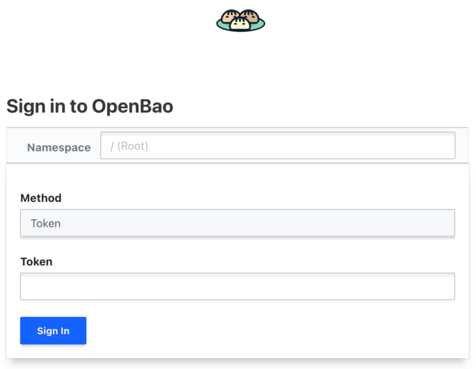
Login with the root token from initialization, or with credentials once authentication is configured.
Upgrading OpenBao
Keep your secrets management up to date. To upgrade an existing deployment:
# Update Helm repository
helm repo update

# Check available versions
helm search repo openbao --versions

# Upgrade with your values file
helm upgrade openbao openbao/openbao \
  --namespace openbao \
  --values openbao-ha-values.yaml

# Watch the rolling update
oc get pods -n openbao -w| After upgrade, pods may need to be unsealed again if they restart. |
Troubleshooting
Pods Not Starting
# Check pod status
oc describe pod openbao-0 -n openbao

# Check pod logs
oc logs openbao-0 -n openbao

# Check events
oc get events -n openbao --sort-by='.lastTimestamp'
PVC Issues
# Check PVC status
oc get pvc -n openbao

# If pending, check storage class
oc describe pvc data-openbao-0 -n openbao
Raft Join Failures
If pods cannot join the Raft cluster:
# Check internal DNS resolution
oc exec -it openbao-0 -n openbao -- nslookup openbao-internal

# Check connectivity between pods
oc exec -it openbao-0 -n openbao -- wget -O- http://openbao-1.openbao-internal:8200/v1/sys/health
What Should Be Considered Next?
Securely store the unseal keys and root token
Configure pod anti-affinity for true HA
Consider auto-unseal for operational ease (upcoming article)
Put everything into a GitOps pipeline
Conclusion
You now have OpenBao running on OpenShift in high-availability mode. This deployment:
Survives pod failures and restarts
Uses Raft for distributed consensus
Integrates with OpenShift security model
Is ready for production use (after unsealing automation)
Key points to remember:
Use HA mode for production
Store unseal keys securely
Configure pod anti-affinity for true HA
Consider auto-unseal for operational ease (upcoming article)
Related Articles



Copyright © 2020 - 2026 Toni Schmidbauer & Thomas Jungbauer
Discussion
Comments are powered by GitHub Discussions. To participate, you'll need a GitHub account.
By loading comments, you agree to GitHub's Privacy Policy. Your data is processed by GitHub, not by this website.