Hosted Control Planes behind a Proxy
December 15, 2025
Updated Jan 2, 2026
-
 Thomas Jungbauer
-
4 min read
(771 words)
Thomas Jungbauer
-
4 min read
(771 words)

Recently, I encountered a problem deploying a Hosted Control Plane (HCP) at a customer site. The installation started successfully—etcd came up fine—but then it just stopped. The virtual machines were created, but they never joined the cluster. No OVN or Multus pods ever started. The only meaningful message in the cluster-version-operator pod logs was:
I1204 08:22:35.473783 1 status.go:185] Synchronizing status errs=field.ErrorList(nil) status=&cvo.SyncWorkerStatus{Generation:1, Failure:(*payload.UpdateError)(0xc0006313b0), Done:575, Total:623,This message did appear over and over again.
Problem Summary
etcd started successfully, but the installation stalled
API server was running
VMs started but never joined the cluster
No OVN or Multus pods ever started
The installation was stuck in a loop
Troubleshooting
Troubleshooting was not straightforward. The cluster-version-operator logs provided the only clue. However, the VMs were already running, so we could log in to them—and there it was, the reason for the stalled installation.
Connect to a VM
To connect to a VM, use the virtctl command. This connects you to the machine as the core user:
You can download virtctl from the OpenShift Downloads page in the OpenShift web console. |
You need the SSH key for the core user. |
virtctl ssh -n clusters-my-hosted-cluster core@vmi/my-node-pool-dsj7z-sss8w (1)| 1 | Replace my-hosted-cluster with the name of your hosted cluster and my-node-pool-dsj7z-sss8w with the name of your VM. |
Verify the Problem
Once logged in, check the journalctl -xf output. In case of a proxy issue, you’ll see an error like this:
> Dec 10 06:23:09 my-node-pool2-gwvjh-rwtx8 sh[2143]: time="2025-12-10T06:23:09Z" level=warning msg="Failed, retrying in 1s ... (3/3). Error: initializing source docker://quay.io/openshift-release-dev/ocp-v4.0-art-dev@sha256:500704de3ef374e61417cc14eda99585450c317d72f454dda0dadd5dda1ba57a: pinging container registry quay.io: Get \"https://quay.io/v2/\": dial tcp 3.209.93.201:443: i/o timeout"So we have a timeout when trying to pull the image from the container registry. This is a classic proxy issue. When you try curl or manual pulls you will get the same message.
Configuring the Proxy for the Hosted Control Plane
The big question is: How do we configure the proxy for the Hosted Control Plane?
This is not well documented yet—in fact, it’s barely documented at all.
The Hosted Control Plane is managed through a custom resource called HostedCluster, and that’s exactly where we configure the proxy.
The upstream documentation at HyperShift Documentation explains that you can add a configuration section to the resource. Let’s do that:
Update the HostedCluster resource with the following configuration:
spec:
  configuration:
    proxy:
      httpProxy: http://proxy.example.com:8080 (1)
      httpsProxy: https://proxy.example.com:8080 (2)
      noProxy: .cluster.local,.svc,10.128.0.0/14,127.0.0.1,localhost (3)
      trustedCA:
name: user-ca-bundle (4)| 1 | HTTP proxy URL |
| 2 | HTTPS proxy URL |
| 3 | Comma-separated list of domains, IPs, or CIDRs to exclude from proxy routing |
| 4 | OPTIONAL: Name of a ConfigMap containing a custom CA certificate bundle |
If you’re using a custom CA, create the ConfigMap beforehand or alongside the HostedCluster resource. The ConfigMap must contain a key named ca-bundle.crt with your CA certificate(s). |
But wait there is more…
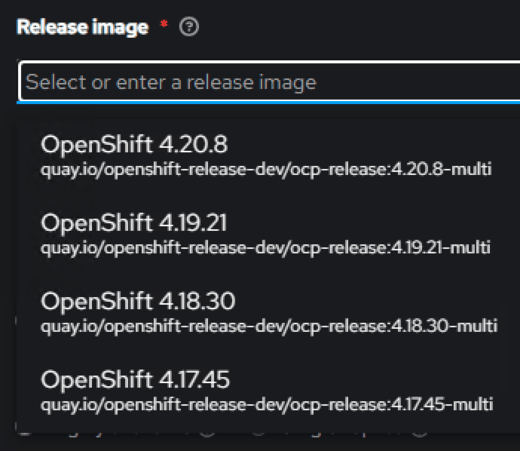
If you are using such a proxy, which is injecting it’s own certificate, then you probably saw the following: The Release Image is not available when you try to deploy a new Hosted Control Plane. The drop down in the UI is empty and you can’t select a release image.
This happens because the Pod that is trying to fetch the image is not able to connect to Github.
You can test this with the following commands:
oc rsh cluster-image-set-controller-XXXXX -n multicluster-engine (1)

curl -v https://github.com/stolostron/acm-hive-openshift-releases.git/info/refs?service=git-upload-pack (2)| 1 | Replace XXXXX with the name of the Pod cluster-image-set-controller in the multicluster-engine namespace |
| 2 | Try to execute the curl command to see if you can connect to Github |
If this command fails with a certificate error, then you need to add the certificate to the Pod/Deployment. A Configmap called trusted-ca-bundle should already exist in the multicluster-engine namespace. If not, it must be created with the certificate chain of your Proxy (key: ca-bundle.crt)
The following command will add the ConfigMap to the deployment.
oc -n multicluster-engine set volume deployment/cluster-image-set-controller --add --type configmap --configmap-name trusted-ca-bundle --name trusted-ca-bundle --mount-path /etc/pki/tls/certs/ --overwriteWait a couple of minutes after the Pods has been restarted. It will try to download the release images from Github again.
You can check the logs of the Pod to see if the download was successful.
oc logs cluster-image-set-controller-XXXXX -n multicluster-engine (1)| 1 | Replace XXXXX with the name of the Pod cluster-image-set-controller in the multicluster-engine namespace |
That should do it, you should now be able to select a release image and deploy a new Hosted Control Plane.
Summary
Related Articles


Copyright © 2020 - 2026 Toni Schmidbauer & Thomas Jungbauer
Discussion
Comments are powered by GitHub Discussions. To participate, you'll need a GitHub account.
By loading comments, you agree to GitHub's Privacy Policy. Your data is processed by GitHub, not by this website.