Advanced br-ex Configuration with Bonding on OpenShift
February 5, 2026
-
 Thomas Jungbauer
-
9 min read
(1814 words)
Thomas Jungbauer
-
9 min read
(1814 words)
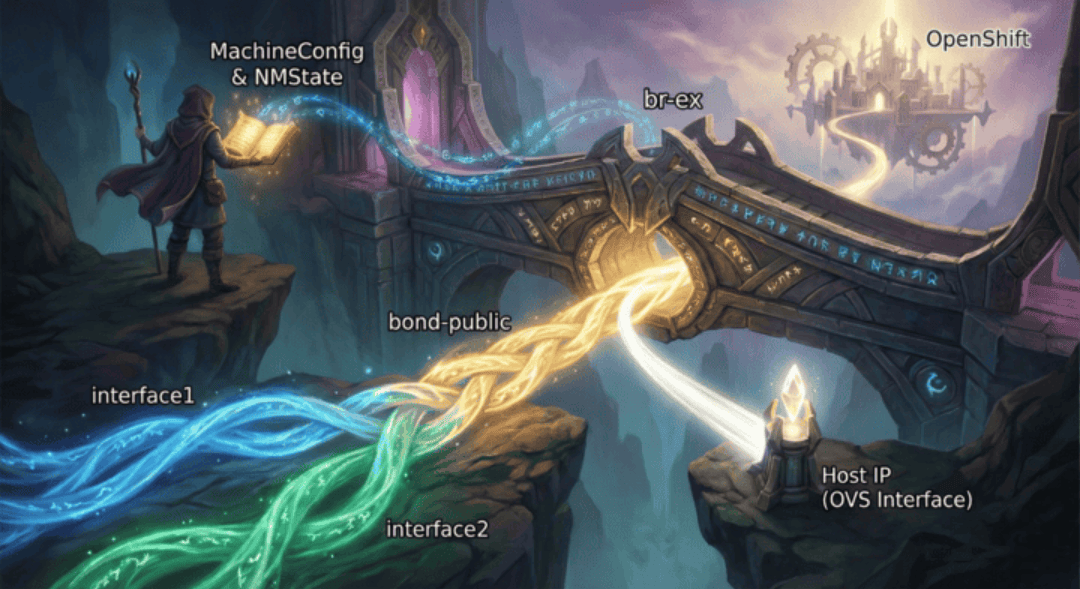
In standard OpenShift Container Platform (OCP) installations, the cluster networking operator relies on default scripts to configure the external bridge, br-ex. While these defaults work for simple setups, production environments frequently demand robust and redundant setups, such as LACP bonding or active-backup configurations that the default scripts cannot guess.
In this article, we explore advanced configurations for the br-ex bridge on OpenShift. We will configure a worker node with a high-availability active-backup bond, attach it to an OVS bridge (br-ex), and ensure the node maintains connectivity.
Introduction
The br-ex (external bridge) is a critical component in OpenShift’s OVN-Kubernetes network architecture. It handles external traffic flowing in and out of the cluster. By default, br-ex is attached to a single network interface, but in production environments, you often need:
High Availability: If one network link fails, traffic continues through the remaining links
Increased Bandwidth: Aggregate bandwidth from multiple interfaces
Load Balancing: Distribute traffic across multiple physical connections
If you already have a cluster running, you can migrate your br-ex bridge to NMState. In this article, I have summarized the process step by step.
| The official documentation can be found at Migrating a configured br-ex bridge to NMState. |
Why Customization is Necessary
By default, OVN-Kubernetes expects a bridge named br-ex to handle traffic exiting the cluster. If you need this bridge to sit on top of a specific bond (like bond-public) rather than a single physical interface, or if you need to enforce specific MAC address policies, you must intervene before the node boots into the cluster.
This method allows you to:
Migrate br-ex bridge to NMState and make postinstallation changes.
Define complex topologies (Bonds, VLANs, Bridges) declaratively.
Persist configuration across reboots and upgrades via the Machine Config Operator.
Decouple networking from the OS installation process.
Prerequisites
Before configuring bonding with br-ex, ensure you have:
OpenShift 4.x cluster with OVN-Kubernetes CNI
OPTIONAL: NMState Operator installed (helps to verify and visualize the configuration on the node)
Multiple network interfaces (interface1 and interface2) available on your nodes
Understanding of your network topology and switch configuration
Understanding Bonding Modes
Linux supports several bonding modes. The most common ones for OpenShift deployments and supported by OpenShift Virtualization are:
| Mode | Name | Description |
|---|---|---|
1 | active-backup | Only one interface active at a time. Failover when active fails. No switch configuration required. |
2 | balance-xor | XOR-based load balancing. Requires switch configuration. |
4 | 802.3ad (LACP) | Dynamic link aggregation. Requires switch support for LACP. |
| Mode LACP is recommended for production environments when switch support is available, as it provides both redundancy and load balancing. |
The Technical Setup
We will implement the following network topology:
Physical Interfaces: interface1 and interface2 (configured as secondary).
Bond Interface: bond-public in active-backup mode.
OVS Bridge: br-ex (the standard OVN external bridge) using bond-public as a port.
Host Networking: The node’s IP address will be assigned to the br-ex OVS interface (internal port), effectively moving the management IP from the physical NIC to the bridge.
Migration Process
The migration process is quite simple. We will use the MachineConfig Operator to apply the configuration to the node.
This means we will:
Create the NMState configuration file
Encode it as base64
Create a MachineConfig object for the required nodes
Apply the MachineConfig object to the required nodes aka reboot the node
Create the NMState configuration file
First, we need to create the NMState configuration file. This file will be used to configure the network on the node. We will define two interfaces interface1 and interface2 and a bond interface bond-public in active-backup mode. The br-ex bridge will be configured to use the bond-public interface. The MAC address from interface2 will be copied to the bond-public and br-ex interfaces. This ensures consistent MAC addressing for ARP/DHCP and prevents IP conflicts during failover.
| This is the crucial step in the migration process. |
interfaces:
########################################################
# Interface 1
########################################################
- name: interface1 (1)
  type: ethernet
  state: up
  ipv4:
    enabled: false
  ipv6:
    enabled: false
########################################################
# Interface 2
########################################################
- name: interface2 (2)
  type: ethernet
  state: up
  ipv4:
    enabled: false
  ipv6:
    enabled: false
########################################################
# Bond interface
########################################################
- description: Bond interface for public LAN interfaces
  ipv4:
    enabled: false
  link-aggregation:
    mode: active-backup (3)
    port: (4)
      - interface1
      - interface2
  name: bond-public (5)
  state: up
  type: bond
  copy-mac-from: interface2 (6)
########################################################
# OVS Bridge
########################################################
- name: br-ex (7)
  type: ovs-bridge (8)
  state: up
  ipv4:
    enabled: false
    dhcp: false
  ipv6:
    enabled: false
    dhcp: false
  bridge:
    options:
      mcast-snooping-enable: true
    port: (9)
      - name: bond-public
      - name: br-ex
########################################################
# OVS Interface
########################################################
- name: br-ex
  type: ovs-interface
  state: up
  copy-mac-from: interface2 (10)
  ipv4:
    enabled: true
    dhcp: true
    auto-route-metric: 48 (11)
  ipv6:
enabled: false| 1 | Specification of interface1 |
| 2 | Specification of interface2 |
| 3 | Bonding mode: active-backup in this example |
| 4 | Port of the bond interface (interface1 and interface2) |
| 5 | Name of the bond interface |
| 6 | Copy the MAC address from the interface2 to the bond interface |
| 7 | Specification of the bridge (ovs-bridge) |
| 8 | Type of the bridge (ovs-bridge) |
| 9 | Port of the bridge (bond-public and br-ex) |
| 10 | Copy the MAC address from the interface2 to the interface |
| 11 | Auto-route metric - Set the parameter to 48 to ensure the br-ex default route always has the highest precedence (lowest metric). This configuration prevents routing conflicts with any other interfaces that are automatically configured by the NetworkManager service. |
With this configuration we can now create a MachineConfig object and roll out the changes.
Encode the Configuration as base64
We need to encode the configuration as base64. This is required by the MachineConfig Operator.
Assuming you have the command line tool base64 installed and stored the configuration in a file called br-ex-public.yaml, you can encode the configuration as follows.
cat br-ex-public.yaml | base64 -w 0The result will be a long string of characters. This is the base64 encoded configuration, that we will use in the next step.
Create the MachineConfig object
To apply this during installation (or via the Machine Config Operator after the deployment), we wrap the NMState YAML above into a MachineConfig object.
We need the base64 encoded string and will place it in a specific path: /etc/nmstate/openshift/<filename>.yml
From the official documentation: "For each node in your cluster, specify the hostname path to your node and the base-64 encoded Ignition configuration file data for the machine type. The worker role is the default role for nodes in your cluster. You must use the .yml (not yaml !) extension for configuration files, such as $(hostname -s).yml when specifying the short hostname path for each node or all nodes in the MachineConfig manifest file."
In short: For each node, create a file named <hostname>.yml containing the base64-encoded NMState configuration. Note that you must use the .yml extension (not .yaml).
| If you have one single configuration for ALL nodes, you can create one configuration file called cluster.yml. However, I personally do not recommend this approach, as over time new nodes might have different hardware and therefore different network configurations. |
In the configuration below, we are targeting a specific worker named wrk01.
apiVersion: machineconfiguration.openshift.io/v1
kind: MachineConfig
metadata:
  labels:
    machineconfiguration.openshift.io/role: worker (1)
  name: 10-br-ex-wrk01 (2)
spec:
  config:
    ignition:
      version: 3.2.0
    storage:
      files:
      - contents:
          # This source is the Base64 encoded version of the NMState YAML above
          source: data:text/plain;charset=utf-8;base64,<BASE64_ENCODED_STRING> (3)
        mode: 0644
        overwrite: true
        # The path determines which node picks up the config.
        # Use 'cluster.yml' to apply to all nodes in this MachineConfig pool.
path: /etc/nmstate/openshift/wrk01.yml (4)| 1 | Valid for node with the role worker |
| 2 | Name of the MachineConfig object |
| 3 | Base64 encoded configuration |
| 4 | Path to the configuration file. This configuration is valid for the node with the hostname wrk01. |
Apply the MachineConfig Object
The above MachineConfig object must now be applied to the cluster. There are two scenarios to do this:
Scenario A: Post-Installation / Migration of existing nodes
Save the YAML to 10-br-ex-wrk01.yaml.
Run oc apply -f 10-br-ex-wrk01.yaml
Reboot the applicable nodes to apply the configuration. You can either do this manually or use the MachineConfigPool to reboot the nodes. The following example forces a reboot on all nodes with the role worker.
apiVersion: machineconfiguration.openshift.io/v1
kind: MachineConfig
metadata:
  labels:
    machineconfiguration.openshift.io/role: worker
  name: 10-force-reboot-worker
spec:
  config:
    ignition:
      version: 3.2.0
    storage:
      files:
      - contents:
          source: data:text/plain;charset=utf-8;base64,
        mode: 0644
        overwrite: true
        path: /etc/force-reboot
Scenario B: During Installation
Here the configuration will be applied during the installation process.
Run openshift-install create manifests to create the manifest files.
Copy the YAML file above into the openshift/ directory.
Run openshift-install create ignition-configs.
Deploy your nodes. The configuration will be applied on the very first boot.
Verifying the Configuration
Once the node is online, it is crucial to verify that the interfaces came up correctly and that traffic is flowing through the bond.
# Check bond status
oc debug node/<node-name> -- chroot /host cat /proc/net/bonding/bond-public

# Check the state of the specific interfaces
nmstatectl show br-ex bond-public
# Look for state: up on both interfaces and ensure bond-public lists the correct ports (interface1 and interface2).

# Verify br-ex bridge
oc debug node/<node-name> -- chroot /host ovs-vsctl show

#Expected Output:
#
#Plaintext
#    Bridge br-ex
#        Port br-ex
#            Interface br-ex
#                type: internal
#        Port bond-public
#            Interface bond-public
#                type: bond
Test Failover
To test the active-backup bonding:
Start a continuous ping to an external IP, for example:
ping 8.8.8.8Physically disconnect (or administratively down) the active interface (e.g., interface1).
Observe the ping. You should see minimal packet loss (usually just 1 or 2 packets) as traffic fails over to interface2.
Troubleshooting
Common Issues
Bond not forming:
Verify both interfaces are physically connected
Check switch port configuration matches bonding mode
Review NMState logs:
oc logs -n openshift-nmstate deployment/nmstate-handler
Traffic not flowing:
Verify br-ex is properly attached to the bond
Check OVN-Kubernetes pods are running
Review node network configuration:
oc debug node/<node-name> — chroot /host nmcli connection show
Rollback Procedure
If the configuration fails and the node becomes unreachable:
Boot the node into single-user mode or use console access
Remove the NMState configuration file:
rm /etc/nmstate/openshift/<hostname>.ymlRestart NetworkManager:
systemctl restart NetworkManagerThe node should revert to the default network configuration
Alternatively, delete the MachineConfig from the cluster (from a working node):
oc delete machineconfig 10-br-ex-wrk01This will trigger a rollback on the affected nodes during the next reboot.
Conclusion
By using MachineConfig to inject an NMState policy at /etc/nmstate/openshift/, we successfully bypassed the default network scripts. We created a robust OVS bridge (br-ex) backed by an active-backup bond (bond-public), ensuring that our OpenShift worker node (wrk01) is both redundant and compliant with OVN-Kubernetes networking requirements.
Configuring br-ex with bonding provides essential redundancy and can improve network throughput for your OpenShift cluster. Choose the appropriate bonding mode based on your switch capabilities and requirements:
Use active-backup for simple failover without switch configuration
Use 802.3ad (LACP) for optimal redundancy and load balancing when switches support it
Use balance-alb when you need load balancing but lack switch support
Always test your configuration in a non-production environment before applying to production clusters.
Related Articles




Copyright © 2020 - 2026 Toni Schmidbauer & Thomas Jungbauer
Discussion
Comments are powered by GitHub Discussions. To participate, you'll need a GitHub account.
By loading comments, you agree to GitHub's Privacy Policy. Your data is processed by GitHub, not by this website.