Summary: OpenShift Platform
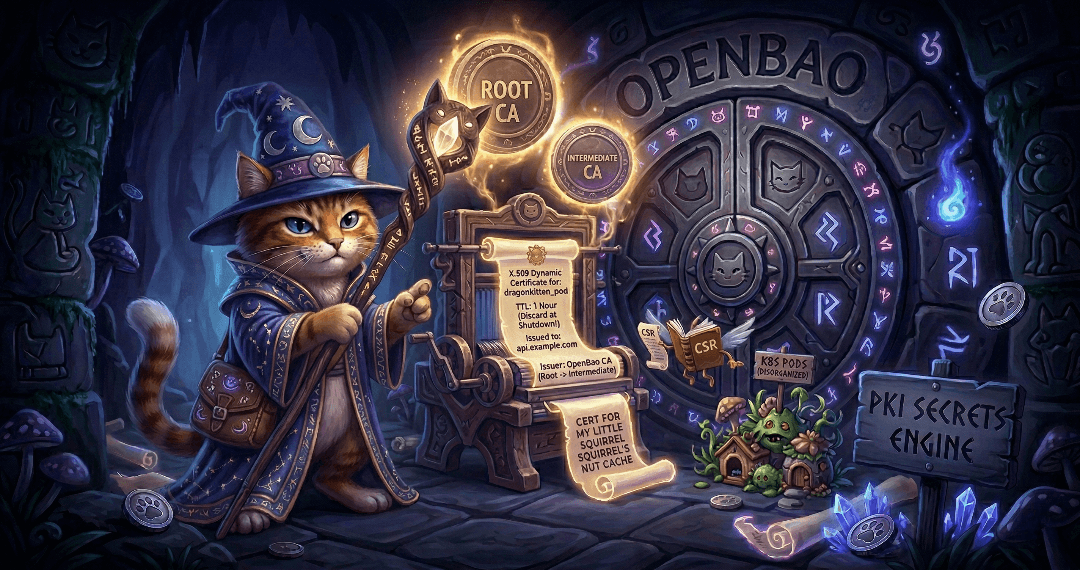
The Guide to OpenBao - Secrets Engines PKI - Part 9
 Thomas Jungbauer
Secrets engines are one of the most important concepts in OpenBao. Part 8 covered the KV secrets engine; this article covers the PKI secrets engine and its integration with cert-manager on Kubernetes and OpenShift.
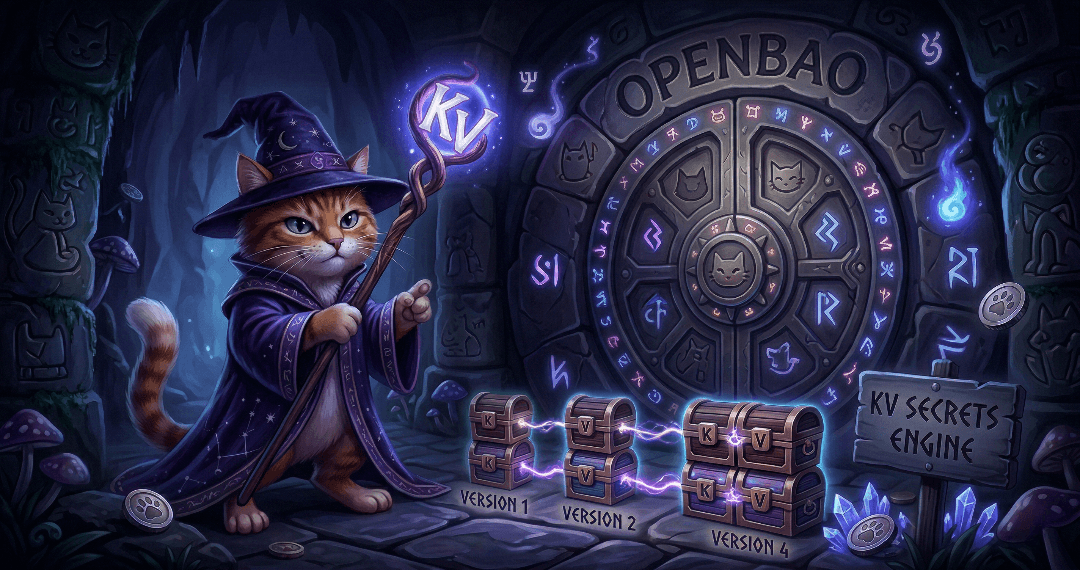
The Guide to OpenBao - Secrets Engines KV - Part 8
Secrets engines are the heart of OpenBao’s functionality. They store, generate, or encrypt data. This article covers the most commonly used secrets engine: KV for static secrets. It will demonstrate how to use the KV secrets engine to store and retrieve secrets. Upcoming articles will cover the PKI secrets engine and the integration with cert-manager.

The Guide to OpenBao - Authentication Methods - Part 7
With OpenBao deployed and running, the next critical step is configuring authentication. Ultimately, you want to limit access to only authorised people. This article covers two common authentication methods: Kubernetes for pods and LDAP for enterprise directories (in a simplified example). There are many more methods, but we cannot cover them all in this article.

The Guide to OpenBao - Initialisation, Unsealing, and Auto-Unseal - Part 6
After deploying OpenBao via GitOps (Part 5), OpenBao must be initialised and then unsealed before it becomes functional. You usually do not want to do this unsealing manually, since this is not scalable especially in bigger, productive environments. This article explains how to handle initialisation and unsealing, and possible options to configure an auto-unseal process so that OpenBao unseals itself on every restart without manual key entry.

The Guide to OpenBao - GitOps Deployment with Argo CD - Part 5
Following the GitOps mantra "If it is not in Git, it does not exist", this article demonstrates how to deploy and manage OpenBao using Argo CD. This approach provides version control, audit trails, and declarative management for your secret management infrastructure.

The Guide to OpenBao - Enabling TLS on OpenShift - Part 4
In Part 3 we deployed OpenBao on OpenShift in HA mode with TLS disabled: the OpenShift Route terminates TLS at the edge, and traffic from the Route to the pods is plain HTTP. While this is ok for quick tests, for a production-ready deployment, you should consider TLS for the entire journey. This article explains why and how to enable TLS end-to-end using the cert-manager operator, what to consider, and the exact steps to achieve it.

The Guide to OpenBao - OpenShift Deployment with Helm - Part 3
After understanding standalone installation in Part 2, it is time to deploy OpenBao on OpenShift/Kubernetes using the official Helm chart. This approach provides high availability, Kubernetes-native management, and seamless integration with the OpenShift ecosystem.

The Guide to OpenBao - Standalone Installation - Part 2
In the previous article, we introduced OpenBao and its core concepts. Now it is time to get our hands dirty with a standalone installation. This approach is useful for testing, development environments, edge deployments, or scenarios where Kubernetes is not available.

The Guide to OpenBao - Introduction - Part 1
I finally had some time to dig into Secret Management. For my demo environments, SealedSecrets is usually enough to quickly test something. But if you want to deploy a real application with Secret Management, you need to think of a more permanent solution.
This article is the first of a series of articles about OpenBao, a HashiCorp Vault fork. Today, we will explore what OpenBao is, why it was created, and when you should consider using it for your secret management needs. If you are familiar with HashiCorp Vault, you will find many similarities, but also some important differences that we will discuss.

OKD Single node installation in a disconnected environment
 Toni Schmidbauer
Because of reasons we had to set up a disconnected single node OKD "cluster". This is our brain dump as the OKD documentation sometimes refers to OpenShift image locations, we had to read multiple sections to get it working and we also consulted the OpenShift documentation at https://docs.redhat.com.
| Updated on 2026-03-03: Fixed install-config.yaml and create manifest command |
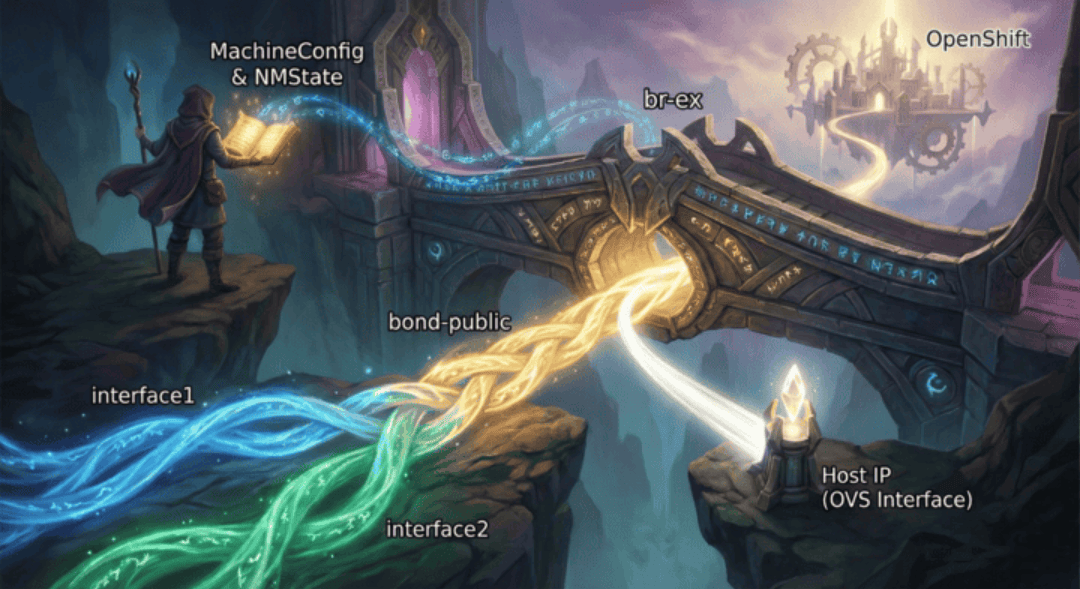
Advanced br-ex Configuration with Bonding on OpenShift
In standard OpenShift Container Platform (OCP) installations, the cluster networking operator relies on default scripts to configure the external bridge, br-ex. While these defaults work for simple setups, production environments frequently demand robust and redundant setups, such as LACP bonding or active-backup configurations that the default scripts cannot guess.
In this article, we explore advanced configurations for the br-ex bridge on OpenShift. We will configure a worker node with a high-availability active-backup bond, attach it to an OVS bridge (br-ex), and ensure the node maintains connectivity.

OpenShift Virtualization Networking - The Overview
It’s time to dig into OpenShift Virtualization. You read that right, OpenShift Virtualization, based on kubevirt allows you to run Virtual Machines on top of OpenShift, next to Pods. If you come from a pure Kubernetes background, OpenShift Virtualization can feel like stumbling into a different dimension. In the world of Pods, we rarely care about Layer 2, MAC addresses, or VLANs. The SDN (Software Defined Network) handles the magic and we are happy.
But Virtual Machines are different….

Hosted Control Planes behind a Proxy
Recently, I encountered a problem deploying a Hosted Control Plane (HCP) at a customer site. The installation started successfully—etcd came up fine—but then it just stopped. The virtual machines were created, but they never joined the cluster. No OVN or Multus pods ever started. The only meaningful message in the cluster-version-operator pod logs was:

The Hitchhiker's Guide to Observability - Limit Read Access to Traces - Part 8
In the previous articles, we deployed a distributed tracing infrastructure with TempoStack and OpenTelemetry Collector. We also deployed a Grafana instance to visualize the traces. The configuration was done in a way that allows everybody to read the traces. Every system:authenticated user is able to read ALL traces. This is usually not what you want. You want to limit trace access to only the appropriate namespace.
In this article, we’ll limit the read access to traces. The users of the team-a namespace will only be able to see their own traces.

The Hitchhiker's Guide to Observability - Here Comes Grafana - Part 7
While we have been using the integrated tracing UI in OpenShift, it is time to summon Grafana. Grafana is a visualization powerhouse that allows teams to build custom dashboards, correlate traces with logs and metrics, and gain deep insights into their applications. In this article, we’ll deploy a dedicated Grafana instance for team-a in their namespace, configure a Tempo datasource, and create a dashboard to explore distributed traces.

The Hitchhiker's Guide to Observability - Adding A New Tenant - Part 6
While we have created our distributed tracing infrastructure, we created two tenants as an example. In this article, I will show you how to add a new tenant and which changes must be made in the TempoStack and the OpenTelemetry Collector.
This article was mainly created as a quick reference guide to see which changes must be made when adding new tenants.

The Hitchhiker's Guide to Observability - Understanding Traces - Part 5
With the architecture established, TempoStack deployed, the Central Collector configured, and applications generating traces, it’s time to take a step back and understand what we’re actually building. Before you deploy more applications and start troubleshooting performance issues, you need to understand how to read and interpret distributed traces.
Let’s decode the matrix of distributed tracing!
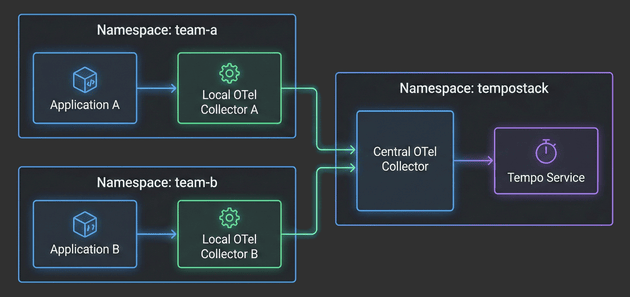
The Hitchhiker's Guide to Observability - Example Applications - Part 4
With the architecture defined, TempoStack deployed, and the Central Collector configured, we’re now ready to complete the distributed tracing pipeline. It’s time to deploy real applications and see traces flowing through the entire system!
In this fourth installment, we’ll focus on the application layer - deploying Local OpenTelemetry Collectors in team namespaces and configuring example applications to generate traces. You’ll see how applications automatically get enriched with Kubernetes metadata, how namespace-based routing directs traces to the correct TempoStack tenants, and how the entire two-tier architecture comes together.

The Hitchhiker's Guide to Observability - Central Collector - Part 3
With the architecture defined in Part 1 and TempoStack deployed in Part 2, it’s time to tackle the heart of our distributed tracing system: the Central OpenTelemetry Collector. This is the critical component that sits between your application namespaces and TempoStack, orchestrating trace flow, metadata enrichment, and tenant routing.

The Hitchhiker's Guide to Observability - Grafana Tempo - Part 2
After covering the fundamentals and architecture in Part 1, it’s time to get our hands dirty! This article walks through the complete implementation of a distributed tracing infrastructure on OpenShift.
We’ll deploy and configure the Tempo Operator and a multi-tenant TempoStack instance. For S3 storage we will use the integrated OpenShift Data Foundation. However, you can use whatever S3-compatible storage you have available.
The Hitchhiker's Guide to Observability Introduction - Part 1
With this article I would like to summarize and, especially, remember my setup. This is Part 1 of a series of articles that I split up so it is easier to read and understand and not too long. Initially, there will be 6 parts, but I will add more as needed.
Red Hat Quay Registry - Integrate Keycloak
This guide shows you how to configure Keycloak as an OpenID Connect (OIDC) provider for Red Hat Quay Registry. It covers what to configure in Keycloak, what to put into Quay’s config.yaml (or Operator config), how to verify the login flow, and how to switch your Quay initial/admin account (stored locally in Quay’s DB) to an admin user that authenticates via Keycloak.
A second look into the Kubernetes Gateway API on OpenShift
This is our second look into the Kubernetes Gateway API an it’s integration into OpenShift. This post covers TLS configuration.
The Kubernetes Gateway API is new implementation of the ingress, load balancing and service mesh API’s. See upstream for more information.
Also the OpenShift documentation provides an overview of the Gateway API and it’s integration.
We demonstrate how to add TLS to our Nginx deployment, how to implement a shared Gateway and finally how to implement HTTP to HTTPS redirection with the Gateway API. Furthermore we cover how HTTPRoute objects attach to Gateways and dive into ordering of HTTPRoute objects.
A first look into the Kubernetes Gateway API on OpenShift
This blog post summarizes our first look into the Kubernetes Gateway API and how it is integrated in OpenShift.
Cert-Manager Policy Approver in OpenShift
One of the most commonly deployed operators in OpenShift environments is the Cert-Manager Operator. It automates the management of TLS certificates for applications running within the cluster, including their issuance and renewal.
The tool supports a variety of certificate issuers by default, including ACME, Vault, and self-signed certificates. Whenever a certificate is needed, Cert-Manager will automatically create a CertificateRequest resource that contains the details of the certificate. This resource is then processed by the appropriate issuer to generate the actual TLS certificate. The approval process in this case is usually fully automated, meaning that the certificate is issued without any manual intervention.
But what if you want to have more control? What if certificate issuance must follow strict organizational policies, such as requiring a specifc country code or organization name? This is where the CertificateRequestPolicy resource, a resource provided by the Approver Policy, comes into play.
This article walks through configuring the Cert-Manager Approver Policy in OpenShift to enforce granular policies on certificate requests.
Single log out from Keycloak and OpenShift
The following 1-minute article is a follow-up to my previous article about how to use Keycloak as an authentication provider for OpenShift. In this article, I will show you how to configure Keycloak and OpenShift for Single Log Out (SLO). This means that when you log out from Keycloak, you will also be logged out from OpenShift automatically. This requires some additional configuration in Keycloak and OpenShift, but it is not too complicated.
Step by Step - Using Keycloak Authentication in OpenShift
I was recently asked about how to use Keycloak as an authentication provider for OpenShift. How to install Keycloak using the Operator and how to configure Keycloak and OpenShift so that users can log in to OpenShift using OpenID. I have to admit that the exact steps are not easy to find, so I decided to write a blog post about it, describing each step in detail. This time I will not use GitOps, but the OpenShift and Keycloak Web Console to show the steps, because before we put it into GitOps, we need to understand what is actually happening.
This article tries to explain every step required so that a user can authenticate to OpenShift using Keycloak as an Identity Provider (IDP) and that Groups from Keycloak are imported into OpenShift. This article does not cover a production grade installation of Keycloak, but only a test installation, so you can see how it works. For production, you might want to consider a proper database (maybe external, but at least with a backup), high availability, etc.).
Introducing AdminNetworkPolicies
Classic Kubernetes/OpenShift offer a feature called NetworkPolicy that allows users to control the traffic to and from their assigned Namespace. NetworkPolicies are designed to give project owners or tenants the ability to protect their own namespace. Sometimes, however, I worked with customers where the cluster administrators or a dedicated (network) team need to enforce these policies.
Since the NetworkPolicy API is namespace-scoped, it is not possible to enforce policies across namespaces. The only solution was to create custom (project) admin and edit roles, and remove the ability of creating, modifying or deleting NetworkPolicy objects. Technically, this is possible and easily done. But shifts the whole network security to cluster administrators.
Luckily, this is where AdminNetworkPolicy (ANP) and BaselineAdminNetworkPolicy (BANP) comes into play.
OpenShift Data Foundation - Noobaa Bucket Data Retention (Lifecycle)
Data retention or lifecycle configuration for S3 buckets is done by the S3 provider directly. The provider keeps track and files are automatically rotated after the requested time.
This article is a simple step-by-step guide to configure such lifecycle for OpenShift Data Foundation (ODF), where buckets are provided by Noobaa. Knowledge about ODF is assumed, however similar steps can be reproduced for any S3-compliant storage operator.
Running Falco on OpenShift 4.12
As mentioned in our previous post about Falco, Falco is a security tool to monitor kernel events like system calls or Kubernetes audit logs to provide real-time alerts.
In this post I'll show to customize Falco for a specific use case. We would like to monitor the following events:
- An interactive shell is opened in a container
- Log all commands executed in an interactive shell in a container
- Log read and writes to files within an interactive shell inside a container
- Log commands execute via `kubectl/oc exec` which leverage the
pod/execK8s endpoint
Quay Deployment and Configuration using GitOps
Installing and configuring Quay Enterprise using a GitOps approach is not as easy as it sounds. On the one hand, the operator is deployed easily, on the other hand, the configuration of Quay is quite tough to do in a declarative way and syntax rules must be strictly followed.
In this article, I am trying to explain how I solved this issue by using a Kubernetes Job and a Helm Chart.
Setting up Falco on OpenShift 4.12
Falco is a security tool to monitor kernel events like system calls to provide real-time alerts. In this post I'll document the steps taken to get Open Source Falco running on an OpenShift 4.12 cluster.
UPDATE: Use the falco-driver-loader-legacy image for OpenShift 4.12 deployments.
How to force a MachineConfig rollout
While playing around with Falco (worth another post) I had to force a MachineConfig update even so the actual configuration of the machine did not change.
This posts documents the steps taken.
Operator installation with Argo CD
GitOps for application deployment and cluster configuration is a must-have I am trying to convince every customer to follow from the very beginning when starting the Kubernetes journey. For me, as more on the infrastructure side of things, I am more focused on the configuration of an environment. Meaning, configuring a cluster, installing an operator etc.
In this article, I would like to share how I deal with cluster configuration when certain Kubernetes objects are dependent on each other and how to use Kubernetes but also Argo CD features to resolve these dependencies.
SSL Certificate Management for OpenShift on AWS
Finally, after a long time on my backlog, I had some time to look into the Cert-Manager Operator and use this Operator to automatically issue new SSL certificates. This article shall show step-by-step how to create a certificate request and use this certificate for a Route and access a service via your Browser. I will focus on the technical part, using a given domain on AWS Route53.
Using ServerSideApply with ArgoCD
„If it is not in GitOps, it does not exist“ - However, managing objects partially only by Gitops was always an issue, since ArgoCD would like to manage the whole object. For example, when you tried to work with node labels and would like to manage them via Gitops, you would need to put the whole node object into ArgoCD. This is impractical since the node object is very complex and typically managed by the cluster. There were 3rd party solutions (like the patch operator), that helped with this issue.
However, with the Kubernetes feature Server-Side Apply this problem is solved. Read further to see a working example of this feature.
Secrets Management - Vault on OpenShift
Sensitive information in OpenShift or Kubernetes is stored as a so-called Secret. The management of these Secrets is one of the most important questions, when it comes to OpenShift. Secrets in Kubernetes are encoded in base64. This is not an encryption format. Even if etcd is encrypted at rest, everybody can decode a given base64 string which is stored in the Secret.
For example: The string Thomas encoded as base64 is VGhvbWFzCg==. This is simply a masked plain text and it is not secure to share these values, especially not on Git.
To make your CI/CD pipelines or Gitops process secure, you need to think of a secure way to manage your Secrets. Thus, your Secret objects must be encrypted somehow. HashiCorp Vault is one option to achieve this requirement.
Overview of Red Hat's Multi Cloud Gateway (Noobaa)
This is my personal summary of experimenting with Red Hat's Multi Cloud Gateway (MCG) based on the upstream Noobaa project. MCG is part of Red Hat's OpenShift Data Foundation (ODF). ODF bundles the upstream projects Ceph and Noobaa.
Overview
Noobaa, or the Multicloud Gateway (MCG), is a S3 based data federation tool. It allows you to use S3 backends from various sources and
- sync
- replicate
- or simply use existing
S3 buckets. Currently the following sources, or backing stores are supported:
Automated ETCD Backup
Securing ETCD is one of the major Day-2 tasks for a Kubernetes cluster. This article will explain how to create a backup using OpenShift Cronjob.
Working with Environments
Imagine you have one OpenShift cluster and you would like to create 2 or more environments inside this cluster, but also separate them and force the environments to specific nodes, or use specific inbound routers. All this can be achieved using labels, IngressControllers and so on. The following article will guide you to set up dedicated compute nodes for infrastructure, development and test environments as well as the creation of IngressController which are bound to the appropriate nodes.
Advanced Cluster Security - Authentication
Red Hat Advanced Cluster Security (RHACS) Central is installed with one administrator user by default. Typically, customers request an integration with existing Identity Provider(s) (IDP). RHACS offers different options for such integration. In this article 2 IDPs will be configured as an example. First OpenShift Auth and second Red Hat Single Sign On (RHSSO) based on Keycloak
Stumbling into Quay: Upgrading from 3.3 to 3.4 with the quay-operator
We had the task of answering various questions related to upgrading Red Hat Quay 3.3 to 3.4 and to 3.5 with the help of the quay-operator.
Thankfully (sic!) everything changed in regards to the Quay operator between Quay 3.3 and Quay 3.4.
So this is a brain dump of the things to consider.
Operator changes
With Quay 3.4 the operator was completely reworked and it basically changed from opinionated to very opinionated. The upgrade works quite well but you have to be aware about the following points:
Secure your secrets with Sealed Secrets
Working with a GitOps approach is a good way to keep all configurations and settings versioned and in sync on Git. Sensitive data, such as passwords to a database connection, will quickly come around. Obviously, it is not a idea to store clear text strings in a, maybe even public, Git repository. Therefore, all sensitive information should be stored in a secret object. The problem with secrets in Kubernetes is that they are actually not encrypted. Instead, strings are base64 encoded which can be decoded as well. Thats not good … it should not be possible to decrypt secured data. Sealed Secret will help here…
Introduction
Pod scheduling is an internal process that determines placement of new pods onto nodes within the cluster. It is probably one of the most important tasks for a Day-2 scenario and should be considered at a very early stage for a new cluster. OpenShift/Kubernetes is already shipped with a default scheduler which schedules pods as they get created accross the cluster, without any manual steps.
However, there are scenarios where a more advanced approach is required, like for example using a specifc group of nodes for dedicated workload or make sure that certain applications do not run on the same nodes. Kubernetes provides different options:
Controlling placement with node selectors
Controlling placement with pod/node affinity/anti-affinity rules
Controlling placement with taints and tolerations
Controlling placement with topology spread constraints
This series will try to go into the detail of the different options and explains in simple examples how to work with pod placement rules. It is not a replacement for any official documentation, so always check out Kubernetes and or OpenShift documentations.
Node Affinity
Node Affinity allows to place a pod to a specific group of nodes. For example, it is possible to run a pod only on nodes with a specific CPU or disktype. The disktype was used as an example for the nodeSelector and yes … Node Affinity is conceptually similar to nodeSelector but allows a more granular configuration.
NodeSelector
One of the easiest ways to tell your Kubernetes cluster where to put certain pods is to use a nodeSelector specification. A nodeSelector defines a key-value pair and are defined inside the specification of the pods and as a label on one or multiple nodes (or machine set or machine config). Only if selector matches the node label, the pod is allowed to be scheduled on that node.
Pod Affinity/Anti-Affinity
While noteSelector provides a very easy way to control where a pod shall be scheduled, the affinity/anti-affinity feature, expands this configuration with more expressive rules like logical AND operators, constraints against labels on other pods or soft rules instead of hard requirements.
The feature comes with two types:
pod affinity/anti-affinity - allows constrains against other pod labels rather than node labels.
node affinity - allows pods to specify a group of nodes they can be placed on
Taints and Tolerations
While Node Affinity is a property of pods that attracts them to a set of nodes, taints are the exact opposite. Nodes can be configured with one or more taints, which mark the node in a way to only accept pods that do tolerate the taints. The tolerations themselves are applied to pods, telling the scheduler to accept a taints and start the workload on a tainted node.
A common use case would be to mark certain nodes as infrastructure nodes, where only specific pods are allowed to be executed or to taint nodes with a special hardware (i.e. GPU).
Topology Spread Constraints
Topology spread constraints is a new feature since Kubernetes 1.19 (OpenShift 4.6) and another way to control where pods shall be started. It allows to use failure-domains, like zones or regions or to define custom topology domains. It heavily relies on configured node labels, which are used to define topology domains. This feature is a more granular approach than affinity, allowing to achieve higher availability.
Using Descheduler
Descheduler is a new feature which is GA since OpenShift 4.7. It can be used to evict pods from nodes based on specific strategies. The evicted pod is then scheduled on another node (by the Scheduler) which is more suitable.
This feature can be used when:
nodes are under/over-utilized
pod or node affinity, taints or labels have changed and are no longer valid for a running pod
node failures
pods have been restarted too many times
oc compliance command line plugin
As described at Compliance Operator the Compliance Operator can be used to scan the OpenShift cluster environment against security benchmark, like CIS. Fetching the actual results might be a bit tricky tough.
With OpenShift 4.8 plugins to the oc command are allowed. One of these plugin os oc compliance, which allows you to easily fetch scan results, re-run scans and so on.
Let’s install and try it out.
Compliance Operator
OpenShift comes out of the box with a highly secure operating system, called Red Hat CoreOS. This OS is immutable, which means that no direct changes are done inside the OS, instead any configuration is managed by OpenShift itself using MachineConfig objects. Nevertheless, hardening certain settings must still be considered. Red Hat released a hardening guide (CIS Benchmark) which can be downloaded at https://www.cisecurity.org/.
Understanding RWO block device handling in OpenShift
In this blog post we would like to explore OpenShift / Kubernetes block device handling. We try to answer the following questions:
What happens if multiple pods try to access the same block device?
What happens if we scale a deployment using block devices to more than one replica?
Writing Operator using Ansible
This quick post shall explain, without any fancy details, how to write an Operator based on Ansible. It is assumed that you know what purpose an Operator has.
As a short summary: Operators are a way to create custom controllers in OpenShift or Kubernetes. It watches for custom resource objects and creates the application based on the parameters in such custom resource object. Often written in Go, the SDK supports Ansible, Helm and (new) Java as well.
Thanos Querier vs Thanos Querier
OpenShift comes per default with a static Grafana dashboard, which will present cluster metrics to cluster administrators. It is not possible to customize this Grafana instance.
However, many customers would like to create their own dashboards, their own monitoring and their own alerting while leveraging the possibilities of OpenShift at the same time and without installing a completely separated monitoring stack.
GitOps - Argo CD
Argo CD is a declarative, GitOps continuous delivery tool for Kubernetes. GitOps itself uses Git pull request to manager infrastructure and application configuration.
Enable Automatic Route Creation
Red Hat Service Mesh 1.1 allows you to enable a "Automatic Route Creation" which will take care about the routes for a specific Gateway. Instead of defining * for hosts, a list of domains can be defined. The Istio OpenShift Routing (ior) synchronizes the routes and creates them inside the Istio namespace. If a Gateway is deleted, the routes will also be removed again.
This new features makes the manual creation of the route obsolete, as it was explained here: Openshift 4 and Service Mesh 4 - Ingress with custom domain
Red Hat Quay Registry - Overview and Installation
Red Hat Quay is an enterprise-quality container registry, which is responsible to build, scan, store and deploy containers. The main features of Quay include:
High Availability
Security Scanning (with Clair)
Registry mirroring
Docker v2
Continuous integration
and much more.
Authorization (RBAC)
Per default all requests inside a Service Mesh are allowed, which can be a problem security-wise. To solve this, authorization, which verifies if the user is allowed to perform a certain action, is required. Istio’s authorization provides access control on mesh-level, namespace-level and workload-level.
Deploy Example Bookinfo Application
To test a second application, a bookinfo application shall be deployed as an example.
The following section finds it’s origin at:
OpenShift Pipelines - Tekton Introduction
OpenShift Pipelines is a cloud-native, continuous integration and delivery (CI/CD) solution for building pipelines using Tekton. Tekton is a flexible, Kubernetes-native, open-source CI/CD framework that enables automating deployments across multiple platforms (Kubernetes, serverless, VMs, etc) by abstracting away the underlying details. [1]
Service Mesh 1.1 released
April 10th 2020 Red Hat released Service Mesh version 1.1 which supports the following versions:
Istio - 1.4.6
Kiali - 1.12.7
Jaeger - 1.17.1
Authentication JWT
Welcome to tutorial 10 of OpenShift 4 and Service Mesh, where we will discuss authentication with JWT. JSON Web Token (JWT) is an open standard that allows to transmit information between two parties securely as a JSON object. It is an authentication token, which is verified and signed and therefore trusted. The signing can be achieved by using a secret or a public/private key pair.
Service Mesh can be used to configure a policy which enables JWT for your services.
Mutual TLS Authentication
When more and more microservices are involved in an application, more and more traffic is sent on the network. It should be considered to secure this traffic, to prevent the possibility to inject malicious packets. Mutual TLS/mTLS authentication or two-way authentication offers a way to encrypt service traffic with certificates.
With Red Hat OpenShift Service Mesh, Mutual TLS can be used without the microservice knowing that it is happening. The TLS is managed completely by the Service Mesh Operator between two Envoy proxies using a defined mTLS policy.
Fault Injection
Tutorial 8 of OpenShift 4 and Service Mesh tries to cover Fault Injection by using Chaos testing method to verify if your application is running. This is done by adding the property HTTPFaultInjection to the VirtualService. The settings for this property can be for example: delay, to delay the access or abort, to completely abort the connection.
"Adopting microservices often means more dependencies, and more services you might not control. It also means more requests on the network, increasing the possibility for errors. For these reasons, it’s important to test your services’ behavior when upstream dependencies fail." [1]
Limit Egress/External Traffic
Sometimes services are only available from outside the OpenShift cluster (like external API) which must be reached. Part 7 of OpenShift 4 and Service Mesh takes care and explains how to control the egress or external traffic. All operations have been successdully tested on OpenShift 4.3.
Advanced Routing Example
Welcome to part 6 of OpenShift 4 and Service Mesh Advanced routing, like Canary Deployments, traffic mirroring and loadbalancing are discussed and tested. All operations have been successdully tested on OpenShift 4.3.
Helpful oc / kubectl commands
This is a list of useful oc and/or kubectl commands so they won’t be forgotton. No this is not a joke…
Routing Example
In part 5 of the OpenShift 4 and Service Mesh tutorials, basic routing, using the objects VirtualService and DesitnationRule, are described. All operations have been successfully tested on OpenShift 4.3.
Ingress with custom domain
| Since Service Mesh 1.1, there is a better way to achieve the following. Especially the manual creation of the route is not required anymore. Check the following article to Enable Automatic Route Creation. |
Often the question is how to get traffic into the Service Mesh when using a custom domains. Part 4 our our tutorials series OpenShift 4 and Service Mesh will use a dummy domain "hello-world.com" and explains the required settings which must be done.
Ingress Traffic
Part 3 of tutorial series OpenShift 4 and Service Mesh will show you how to create a Gateway and a VirtualService, so external traffic actually reaches your Mesh. It also provides an example script to run some curl in a loop.
Deploy Microservices
The second tutorials explains how to install an example application containing thee microservices. All operations have been successfully tested on OpenShift 4.3.
Installation
Everything has a start, this blog as well as the following tutorials. This series of tutorials shall provide a brief and working overview about OpenShift Service Mesh. It is starting with the installation and the first steps, and will continue with advanced settings and configuration options.
Copyright © 2020 - 2026 Toni Schmidbauer & Thomas Jungbauer